NAME
Term::Fabulous::Manual::Tables - Tables: how they work, rows, columns, display text and cell widgets
DESCRIPTION
This page is part of Term::Fabulous::Manual. Previous page: Term::Fabulous::Manual::Charts. Next page: Term::Fabulous::Manual::TableRows.
This page starts the table guide. It explains how a Term::Fabulous::Widget::Table turns your data into the lines it shows, defines the terms the guide uses, and describes the rows, the columns, the display text of the cells (mutators) and widgets in cells. Its "FEATURE INDEX" lists every table feature with the section that explains it, on all table pages.
The table documentation has four parts:
- Term::Fabulous::Manual::Tables (this page)
-
How a table works, the terms, rows, columns, display text and mutators, widgets in cells, and the feature index of all table features.
- Term::Fabulous::Manual::TableRows
-
Sorting, filtering, grouping, trees, pages, the cursor and the selection.
- Term::Fabulous::Manual::TableStyles
-
Colors, styles, lines between and around the cells, padding, size, scrolling and printing.
- Term::Fabulous::Widget::Table
-
The reference: every parameter, method, key, mouse action, event and KDL property, with what it takes, returns and when it dies.
Complete programs are in Term::Fabulous::Cookbook::Tables (show, format, size and edit tables, choose columns, KDL, reports), Term::Fabulous::Cookbook::TableRows (sort, filter, group, trees, pages) and Term::Fabulous::Cookbook::TableStyles (lines and colors). examples/table-directory.pl and examples/table-files.pl (see Term::Fabulous::Examples) are larger demos.
TABLES
Term::Fabulous::Widget::Table shows a list of Perl hashes as rows and columns. You describe the columns once; the table handles everything the user does with the rows: moving through them with the keyboard and the mouse, sorting by a click on a column title, filtering, opening and closing groups and tree rows, turning pages and selecting rows. Your program reads and changes the data at any time through the table's methods, and learns about the user's actions through events.
use Term::Fabulous::Widget::Table;
use Term::Fabulous::Widget::Table::Mutator qw(date number);

my $table = Term::Fabulous::Widget::Table->new(
	id        => 'staff',
	row_id    => 'id',
	selection => 'multiple',
	columns   => [
		{ key => 'name',    title => 'Name' },
		{ key => 'started', title => 'Started', type => 'date',   mutator => date('%d %b %Y') },
		{ key => 'salary',  title => 'Salary',  type => 'number', mutator => number( decimals => 0 ) },
	],
	rows => [
		{ id => 1, name => 'Ada',   started => '2019-03-04', salary => 81000 },
		{ id => 2, name => 'Grace', started => '2021-11-15', salary => 76500 },
	],
);
$table->on( RowActivate => sub ($event) { $status->text( 'Open ' . $event->row->{name} ); return } );    # $status: a Text widget
Every table needs an id, unique in the widget tree. The rows scroll inside a widget of their own whose id is the table's id followed by /body (staff/body here), and that widget keeps its scroll position by its id from frame to frame. Without an id, new dies with a table needs an id.
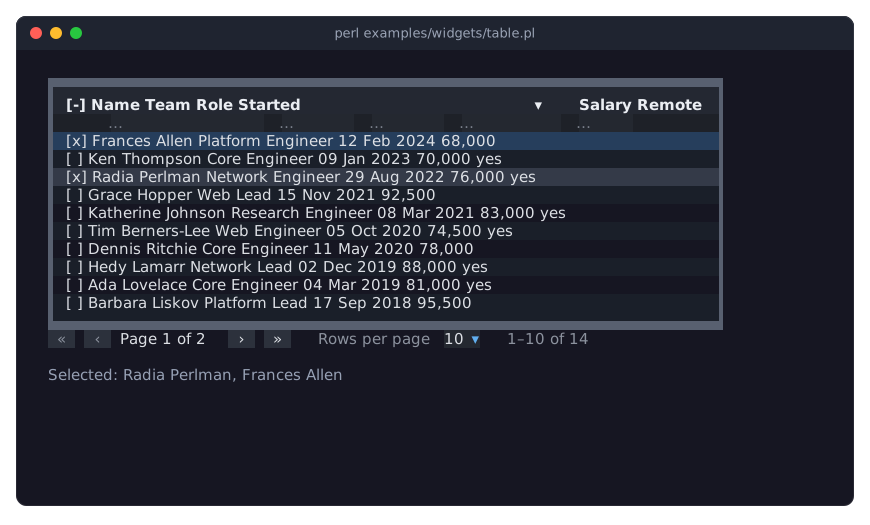
The picture shows examples/widgets/table.pl, a table with a filter row, a sort, a multiple selection and pages:
How a table works
The words in italics are defined in "Table terms".
You give the table rows: hash references such as { id => 7, name => 'Ada', started => 1714739400 }. The table copies them; changing your hashes afterwards changes nothing. Every row has a row id, which names it in all methods and events (see "ROWS").
A column picks one value out of each row, its raw value (by default the row's entry under the column's key), and turns it into the display text, the text the cell shows (with the column's mutators, or as it is). Sorting and filtering use the raw value unless you say otherwise, so a date shown as 3 May 2024 still sorts as a date (see "COLUMNS" and "DISPLAY TEXT AND MUTATORS").
From the rows, the table computes its view, the lines it shows, in five steps:
Filter: rows that do not match every filter and the search are left out; in a tree, the parents of a matching row stay. See "FILTERING" in Term::Fabulous::Manual::TableRows.
Group: with
group_by, rows are put into groups by the values of the group columns, each with a group header line. See "GROUPING" in Term::Fabulous::Manual::TableRows.Sort: rows are sorted within their group and, in a tree, within their parent row. Rows that compare equal keep the order you gave them. See "SORTING" in Term::Fabulous::Manual::TableRows.
Flatten: closed groups and closed tree rows hide what is inside them. See "TREES" in Term::Fabulous::Manual::TableRows.
Page: with a
page_size, the lines are cut into pages, and the table shows one page. See "PAGES" in Term::Fabulous::Manual::TableRows.
The cursor marks one line of the current page: the line the keyboard works on. It is drawn only while the table has the keyboard focus. The selection is a separate set of rows that the user or your program picked (selection => 'single' or 'multiple'); it can contain rows that are not on the current page or are filtered out. See "SELECTION AND CURSOR" in Term::Fabulous::Manual::TableRows.
What the user does fires events on the table: CursorMove, SelectionChange, RowActivate (Enter or a double click on a row), SortChange, FilterChange, PageChange, Expand, Collapse and ColumnsChange (see "EVENTS" in Term::Fabulous::Widget::Table). Changes your program makes through the table's methods (add_row, sort_by, select, ...) fire no events, so a listener never has to tell the user's actions from its own. All changes show in the next frame: the table updates its widgets once per frame, however many changes were made.
The table draws its own lines, joined into one grid: a frame, lines between the columns, optional lines between the rows, and a line below the column titles. Colors, lines and text styles can be set for the whole table, a column, a row or a single cell, also depending on the data (red negative numbers, gray rows of finished tasks). See "STYLES AND BORDERS" in Term::Fabulous::Manual::TableStyles.
Each cell that is shown is about two widgets, and every widget costs time in every frame. For more than a few hundred rows, use page_size; see "PERFORMANCE" in Term::Fabulous::Widget::Table.
Table terms
These terms are used on all pages of the table guide and in the reference.
- row
-
One hash reference of your data, shown as one line of the table. The table stores a copy.
- row id
-
The name of a row: the value of its
row_identry, what arow_idcode reference returns, or a number the table counts up (see "Row ids"). Ids are strings, unique within a table, and never change. - row data
-
The hash of a row as the table stores it, without its child rows. Methods such as
rowreturn new copies of it. Your code (mutators,value,cell, filters,compare,row_style, ...) gets one copy per row that is shared by all of them until the row changes: read it, but do not change it. - column key
-
The name of a column, unique within a table. It is also the hash key the column reads from each row, unless the column has a
valuecode reference. - raw value
-
The value a column reads from a row. Sorting uses it; filters use it unless they say
on => 'display'. - display text
-
The text a cell shows: the raw value after the column's mutators, or the raw value itself.
undefshows as nothing. - mutator
-
A code reference that turns a raw value into display text, for example epoch seconds into
2024-05-03. See "DISPLAY TEXT AND MUTATORS". - view
-
The rows that pass the filters, grouped, sorted and flattened into lines; see "How a table works".
- line
-
One entry of the view: a data row or a group header. Pages count lines, not rows.
- group, group path
-
The rows that share the value of a group column. A group's path is the list of the raw values of its group and the groups around it, outermost first:
[ 'Sales' ], or[ 'Sales', 'Berlin' ]with two group columns. - tree row, child row
-
In a tree (see "TREES" in Term::Fabulous::Manual::TableRows), a row can have child rows, shown indented below it while it is expanded (open).
- open, closed (expanded, collapsed)
-
A tree row or a group is open (expanded) while its rows are shown, and closed (collapsed) while they are hidden. The method names use "expand" and "collapse".
- passes the filters
-
A row passes the filters when it matches all filters and the search, or, in a tree, when one of its child rows (at any depth) does; see "Filters with groups and trees" in Term::Fabulous::Manual::TableRows. Rows that pass are in the view, also when they are inside a closed group or tree row.
- cursor
-
The line the keyboard works on, highlighted while the table has the focus. Every view that has lines has exactly one cursor line.
- selection
-
The set of rows that are selected, shown with the selected color and, with a selection column, with
[x]marks. - style hash
-
A hash reference of looks and lines, such as
{ text_color => '#ff0000', bold => 1, border_bottom => 'Double' }, for a column, a row or a cell. See "Style keys" in Term::Fabulous::Manual::TableStyles. - grid line, frame
-
The lines between the cells are grid lines; the lines around the table are its frame. See "Lines between and around the cells" in Term::Fabulous::Manual::TableStyles.
ROWS
Parameters: rows, row_id
Methods:    rows, row, row_ids, row_count, has_row, value, display_value,
            filtered_row_ids, page_row_ids, add_row, add_rows, update_row,
            replace_row, set_value, remove_row, remove_rows, clear_rows
The rows of a table are an array reference of hash references, given as the rows parameter or later with the rows method. A row can hold more entries than the table has columns; the extra entries are kept and passed to your code (mutators, cell widgets, filters), so a row can carry everything you need to know about it.
my $table = Term::Fabulous::Widget::Table->new(
	id      => 'files',
	row_id  => 'path',
	columns => [ { key => 'name', title => 'Name' }, { key => 'size', title => 'Size', type => 'number' } ],
	rows    => [
		{ path => '/etc/hosts',  name => 'hosts',  size => 220,  owner => 'root' },
		{ path => '/etc/passwd', name => 'passwd', size => 2780, owner => 'root' },
	],
);

$table->rows( \@new_rows );    # replaces all rows
The table copies every row hash when it receives it (one level deep: a nested array or hash inside a row is shared, not copied). Your hashes can be changed or reused afterwards without effect on the table.
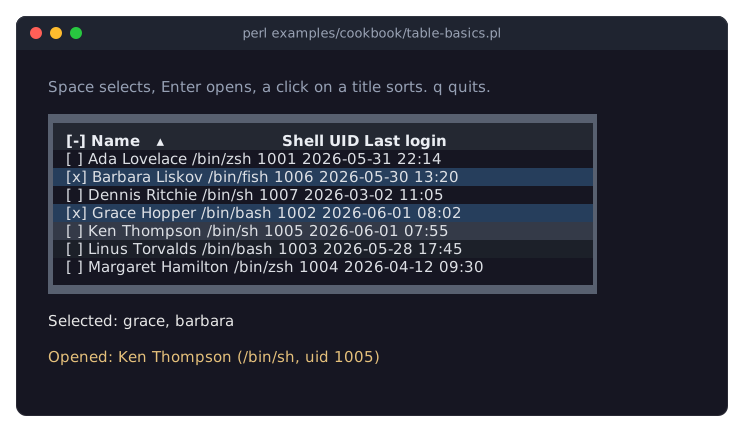
The recipe Show a list of hashes in a table is a complete program:
Row ids
Every row has an id, a string that names it in every method and event ($table->row($id), $event->row_id, ...). The row_id parameter says where it comes from:
row_id => 'path'-
The id is the row's entry under that key. Every row must have a non-empty value there, and no two rows may have the same one; otherwise the call that adds the rows dies, and no row is added.
row_id => sub ($row) { ... }-
The id is what the code reference returns for a copy of the row, for example
sub ($row) { "$row->{host}:$row->{port}" }. The same rules apply. - no
row_id(the default) -
The table numbers the rows itself: 1, 2, 3 and so on, in the order they are added. The numbers keep counting up for the life of the table; a number is never given to a second row, even after its row was removed or
rowsreplaced all rows.add_rowandadd_rowsreturn the new ids.
Use a row_id whenever your data has a natural key: then a row keeps its id when you replace all rows with rows, and with it its selection (rows that are still there stay selected). A row's id never changes: update_row and replace_row die when the new data would give the row another id. row_id can only be changed while the table has no rows.
Reading rows
my $row   = $table->row(7);              # a copy of the row's data
my $all   = $table->rows;                # copies of all rows, as given (children nested)
my @ids   = $table->row_ids;             # every id, in data order
my $count = $table->row_count;
my $raw   = $table->value( 7, 'started' );            # 1714739400
my $text  = $table->display_value( 7, 'started' );    # '03 May 2024'
my @shown = $table->filtered_row_ids;    # the rows that pass the filters
my @page  = $table->page_row_ids;        # the data rows of the current page, in view order
Everything these methods return is a copy; changing it does not change the table. Methods that take a row id die when there is no row with that id; check with has_row first if you are not sure.
Changing the data
my $id  = $table->add_row( { id => 8, name => 'Barbara', started => '2024-02-01', salary => 68000 } );
my @ids = $table->add_rows( \@more, index => 0 );         # at the top

$table->set_value( 8, salary => 70000 );                  # one cell (a column key)
$table->update_row( 8, { salary => 72000, team => 'Web' } );    # some entries (any keys)
$table->replace_row( 8, { id => 8, name => 'Barbara L.' } );    # all entries
$table->remove_row(8);
$table->remove_rows( 2, 3 );
$table->clear_rows;
$table->rows( \@fresh ); # all new rowsadd_rowandadd_rowsappend rows at the end of the data, or atindex(0 is the top). In a tree,parent => $idadds them as child rows of that row (see "Changing a tree" in Term::Fabulous::Manual::TableRows). The position is the data order; the table still shows the rows sorted, grouped and filtered as it is set up.set_valuechanges one entry of a row; the key must be a column key.update_rowmerges a hash of changes into the row (any keys);replace_rowreplaces the whole row data.remove_rowandremove_rowsremove rows and, in a tree, all their child rows. Removed rows leave the selection, and their row and cell styles are forgotten.rowsreplaces all rows. Rows whose id stays keep their selection and their row and cell styles, and show their new data: a program that gives a table withrow_idfresh rows every second sees the new values. A row removed and added again with its id shows its new data as well.None of these fire an event. The cursor stays on its row as long as the row is shown; when it is gone, the cursor moves to the line that takes its place (see "The cursor" in Term::Fabulous::Manual::TableRows).
Changing data that a column's mutator, value code, cell_style or cell widget depends on updates the cell: the table runs the code again for the changed row only. For a cell widget, see "Updating cell widgets instead of rebuilding them".
COLUMNS
Parameters: columns
Methods:    columns, column, column_keys, add_column, remove_column,
            move_column, update_column, visible_columns,
            is_column_visible, show_columns, hide_columns,
            set_visible_columns, open_column_chooser,
            close_column_chooser, is_column_chooser_open
Events:     ColumnsChange
KDL:        column "key" title=... type=... width=... ...
The columns parameter is an array reference with one hash reference per column, in the order they are shown. Only key is required:
columns => [
	{ key => 'name',    title => 'Name', width => 'grow' },
	{ key => 'size',    title => 'Size', type => 'number', mutator => bytes() },
	{ key => 'changed', title => 'Changed', type => 'date', mutator => datetime() },
	{ key => 'note',    title => 'Note', width => 'fit(0, 40)', sortable => 0 },
],
The table turns each hash into a Term::Fabulous::Widget::Table::Column object. That class's page describes every column parameter in full; here is the overview:
key            the column's name and, by default, the row entry it shows (required)
title          the header text (default: the key)
type           'string' (default), 'number' or 'date': alignment, sorting, filtering
value          sub ($row) { ... }: compute the raw value instead of reading the key
mutator        sub ( $value, $row ) { ... } or a list of them: the display text
align          'left', 'center' or 'right' (default: right for numbers, else left)
header_align   the same for the header cell (default: align)
width          'fit', 'fit(8)', 'fit(0, 30)', 'fixed(12)', 'grow', 'grow(10, 40)', 'percent(25)'
wrap           'words' (default), 'newlines' or 'none'
sortable       1 (default) or 0: may the user sort by it?
compare        'string', 'natural', 'number', 'date' or sub ( $a, $b, $row_a, $row_b ) { ... }
filterable     1 (default) or 0: does the filter row have a field for it?
filter_on      'display' or 'value': what its filter field compares
cell           sub ($cell) { ... }: a widget for each cell
update_cell    sub ( $widget, $cell ) { ... }: bring that widget up to date
header         sub ($column) { ... }: a widget for the header cell
cell_style     sub ($cell) { ... }: a style hash per cell (conditional formatting)
style          a style hash for all cells of the column
header_style   a style hash for the header cell
visible        1 (default) or 0: is the column shown at first?
Unknown keys and invalid values die when the column is made. A message about an invalid value names the column (Term::Fabulous::Widget::Table::Column 'qty': align must be 'left', 'center' or 'right', got 'middle'); one about an unknown key names the key (Unrecognised parameters for Term::Fabulous::Widget::Table::Column constructor: 'titel').
Column widths
width sets how wide a column is, in terminal cells (character cells), including the cell padding (one cell left and right by default; see "Cell padding" in Term::Fabulous::Manual::TableStyles):
width => 'fit'           # as wide as the widest cell of the column (the default)
width => 'fit(8)'        # the same, but at least 8 cells
width => 'fit(0, 30)'    # the same, but at most 30 cells; longer text wraps
width => 'fixed(12)'     # exactly 12 cells; longer text wraps
width => 'grow'          # a share of the width the table has left over
width => 'grow(10, 40)'  # the same, between 10 and 40 cells
width => 'percent(25)'   # a quarter of the table's width
The header cell, the filter field and every cell of the column are measured together, so a fit column is as wide as the widest of them. Only the cells that are shown count: the lines of the current page, without the rows inside closed groups and tree rows and without the rows the filters hide. The text typed into a filter field does not count. So a fit column can change its width when the user turns a page, opens a group or filters; with no matching row at all, it shrinks to its title. Give it a fixed or grow width, or a minimum such as 'fit(12)', to keep it steady; with a filter row, do that for every column the user filters, so that the field stays wide enough to type into. The widths also take the hash that the sizing_* functions of Clay::XS return, such as sizing_fixed(12).
A grow or percent column only has room to grow when the table is wider than its columns need: give the table a width with its layout, for example layout => { sizing => { width => sizing_grow() } } (see "SIZE AND SCROLLING" in Term::Fabulous::Manual::TableStyles). Several grow columns share the leftover width. A grow column takes the width the other columns leave over, within its limits, and its text wraps in that width. When the columns need more width than the table has, the rows scroll sideways (see "SIZE AND SCROLLING" in Term::Fabulous::Manual::TableStyles).
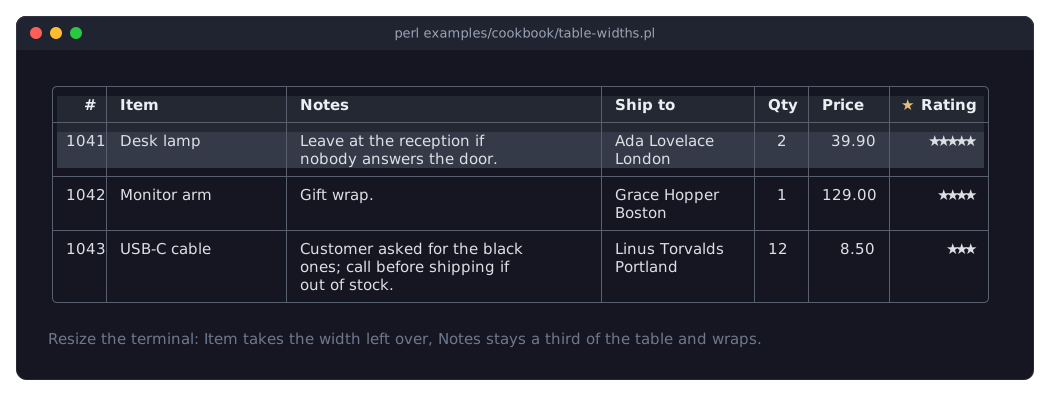
The recipe Size, align and wrap columns shows the widths, the alignment and the wrapping of this and the next two sections. In the picture, # is fixed(6), Item grows into the width the other columns leave over, Notes is percent(33) and wraps at spaces, and Ship to is fit(16) and breaks only at the newlines of its text:
Alignment
align places the content of the column's cells: 'left', 'center' or 'right'. Number columns are right-aligned by default, all others left-aligned. header_align does the same for the header cell and defaults to align. In the picture above, Qty is centered with its title, and the numbers of Price are right-aligned under a left-aligned title:
{ key => 'quantity', title => 'Qty',   type => 'number', align => 'center' }
{ key => 'price',    title => 'Price', type => 'number', header_align => 'left' }
Wrapping and row height
Text that is wider than its column wraps onto more lines, and the row grows: every row is as high as its tallest cell, and rows of different heights can follow each other. wrap decides how text breaks:
wrap => 'words'       # at spaces, and at newlines (the default)
wrap => 'newlines'    # only at newlines in the text
wrap => 'none'        # never; text that does not fit is cut off
Wrapping needs a limit on the column's width ('fit(0, 30)', 'fixed(12)', 'grow', 'percent(25)'); a plain fit column is always as wide as its longest line. Text with newlines is several lines high in every mode but none. A cell widget (see "CELL WIDGETS") can be any number of lines high, too. The column title wraps the same way as the column's cells.
{ key => 'description', title => 'Description', width => 'fit(0, 36)' }    # wraps at 36 cells
{ key => 'address',     title => 'Address',     wrap => 'newlines' }       # "Street 1\n12345 Town"
cell_padding can also add empty terminal rows above and below the content of every cell; see "Cell padding" in Term::Fabulous::Manual::TableStyles.
Changing columns
$table->add_column( { key => 'email', title => 'E-mail' } );               # at the end
$table->add_column( { key => 'rank',  title => '#', type => 'number' }, index => 0 );    # first
$table->remove_column('email');
$table->move_column( rank => 2 );                          # now the third column
$table->update_column( salary => title => 'Pay', mutator => number( decimals => 2 ) );

my $column = $table->column('salary');                     # the Column object
say $column->title, ' (', $column->type, ')';
my @keys = $table->column_keys;                            # in order, hidden ones too
A column is never changed in place. update_column makes a new column from the old one's parameters and your changes (anything but key) and puts it in the old one's place. Whether the column is shown does not change; visible in the changes has no effect (use the methods of "Choosing the visible columns").
Removing a column also removes it from the sort and the grouping, and removes every filter that compares it. The rows keep their entries under its key.
Choosing the visible columns
A hidden column is still part of the table: its values can be read, sorted by and filtered on. It only takes no space on the screen, and the search (see "Searching all columns" in Term::Fabulous::Manual::TableRows) skips it.
columns => [ ..., { key => 'note', title => 'Note', visible => 0 } ],    # hidden at first

$table->hide_columns(qw(note email));
$table->show_columns('note');
$table->set_visible_columns(qw(name team salary));    # exactly these; their order stays
my @shown = $table->visible_columns;                   # the keys, in order
say 'hidden' unless $table->is_column_visible('email');
The order of the columns is always the one of the columns list (and move_column); showing a column puts it back at its place.
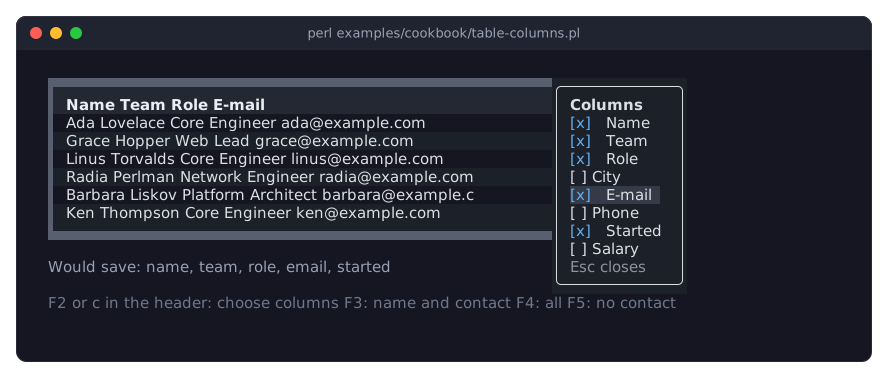
The user can choose the columns, too. A right click on a column title, or c while the keyboard is in the header (press Up on the first line; see "KEYS" in Term::Fabulous::Widget::Table), opens the column chooser: a small list with a check box per column over the table's top right corner. Checking or unchecking a box shows or hides the column at once and fires ColumnsChange. Escape closes the list, and so does moving the focus out of it. Your program can open and close it with open_column_chooser and close_column_chooser, for example from a key binding:
$table->on( ColumnsChange => sub ($event) {
	save_setting( columns => $event->visible );    # [ 'name', 'team', ... ]
	return;
} );
$root->on( KeyPress => sub ($event) {
	$table->open_column_chooser if ( $event->key_name // '' ) eq 'F2';
	return;
} );
The recipe Let the user choose the visible columns is a complete program:
DISPLAY TEXT AND MUTATORS
Column parameters: mutator, value, type
Methods:           display_value, value
Modules:           Term::Fabulous::Widget::Table::Mutator,
                   Term::Fabulous::Widget::Table::Value
A mutator turns a cell's raw value into the text the cell shows. The table keeps both: it sorts and filters by the raw value (unless a filter says otherwise) and shows the display text. So a column of epoch seconds can show 03 May 2024 14:30 and still sort by time, and a column of byte counts can show 1.5 MiB and still sort by size.
The recipe Format cells: dates, numbers, sizes and flags formats every column of a backup report with mutators; its Rate column is a computed column (see "Computed columns"):
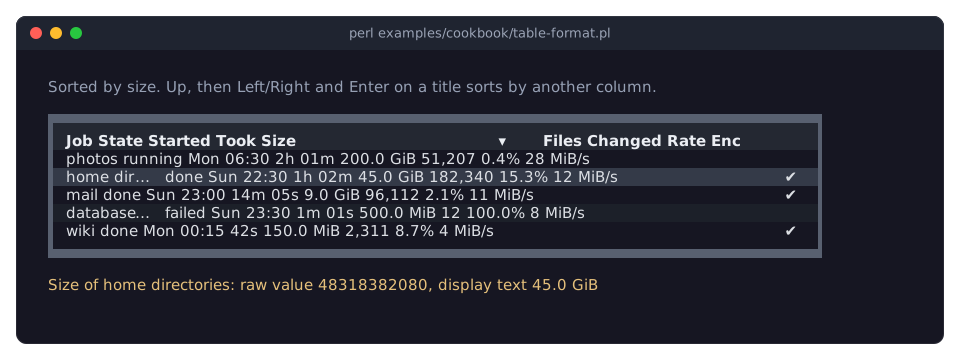
Term::Fabulous::Widget::Table::Mutator makes the common mutators:
use Term::Fabulous::Widget::Table::Mutator qw(datetime date number percent bytes duration boolean lookup truncate);

{ key => 'modified', type => 'date',   mutator => datetime( '%d %b %Y %H:%M', utc => 1 ) }    # 1714739400 -> 03 May 2024 12:30
{ key => 'born',     type => 'date',   mutator => date() }                         # '1815-12-10' -> 1815-12-10
{ key => 'price',    type => 'number', mutator => number( decimals => 2, prefix => '$' ) }    # 1234.5 -> $1,234.50
{ key => 'share',    type => 'number', mutator => percent( decimals => 1 ) }       # 0.153 -> 15.3%
{ key => 'size',     type => 'number', mutator => bytes() }                        # 1536 -> 1.5 KiB
{ key => 'uptime',   type => 'number', mutator => duration() }                     # 3725 -> 1h 02m
{ key => 'active',                     mutator => boolean( 'yes', 'no' ) }
{ key => 'state',                      mutator => lookup( { R => 'running', S => 'sleeping' } ) }
{ key => 'title',                      mutator => truncate(30) }                   # cut with an ellipsis
Any code reference is a mutator. It is called with the raw value and a copy of the row's data, and returns the text:
{ key => 'temp', title => 'Temperature', type => 'number',
  mutator => sub ( $value, $row ) { defined $value ? sprintf( '%.1f %s', $value, $row->{unit} ) : '' } }
Give an array reference of mutators to run them one after the other, each on the result of the one before:
mutator => [ number( decimals => 0 ), sub ( $text, $row ) { "$text pcs" } ]The table runs a column's mutators once per row and keeps the result until the row or the column changes. Read the result with $table->display_value( $id, $key ) and the raw value with $table->value( $id, $key ).
Computed columns
A column does not have to show an entry of the row. With value, it computes its raw value from the whole row:
{ key => 'total', title => 'Total', type => 'number',
  value => sub ($row) { $row->{price} * $row->{quantity} } }

{ key => 'items', title => 'Items', type => 'number',
  value => sub ($row) { scalar @{ $row->{lines} } } }
The computed value is the raw value: the table sorts, filters and groups by it like any other, and the column's mutators turn it into the display text. The code gets a copy of the row's data and runs once per row; the table keeps the result until the row changes. The column's key must still be unique, but need not exist in the rows. In the picture above, Rate computes bytes per second from size and seconds.
Dates and numbers
The type of a column decides how its raw values are read for sorting and filtering. A number column reads numbers ('12.50' is 12.5; a word is no number). A date column reads:
epoch seconds, as numbers or digit strings (
1714739400; note that'2024'is read as 2024 seconds, not as the year);date strings:
2024-05-03,2024-05-03 14:30,2024-05-03T14:30:15, in local time, or in UTC with a trailingZafter the time;objects with an
epochmethod (DateTime, Time::Piece).
Values a column cannot read sort last in both directions. Give a date column type => 'date', so that it sorts and filters as dates. Term::Fabulous::Widget::Table::Value exports the functions the table uses (number_of, date_epoch, date_interval), so your own comparators and filters read values the same way.
CELL WIDGETS
Column parameters: cell, update_cell, header
Methods:           cell_widget
By default a cell is a Term::Fabulous::Widget::Text with the display text. A column's cell code reference can return any widget instead: a Term::Fabulous::Widget::Button, a Term::Fabulous::Widget::Checkbox, a Term::Fabulous::Widget::TextField, a Term::Fabulous::Widget::PixelCanvas, or a Term::Fabulous::Widget::Box with several children.
use Term::Fabulous::Widget::Button;
use Term::Fabulous::Widget::Text;

{ key => 'actions', title => '', sortable => 0, filterable => 0,
  cell => sub ($cell) {
	my $button = Term::Fabulous::Widget::Button->new;
	$button->add_child( Term::Fabulous::Widget::Text->new( text => 'Delete', text_color => '#ffffff' ) );
	my $id = $cell->{id};
	$button->on( Activate => sub ($event) { $cell->{table}->remove_row($id); return } );
	return $button;
  } }
The code gets one hash reference, the cell context, with these keys:
value     the raw value of the cell
display   the display text (after the mutators)
row       a copy of the row's data
id        the row id
column    the Term::Fabulous::Widget::Table::Column object
table     the table
It must return a widget (anything else dies when the cell is built). The table puts the widget into the cell, which gives it the cell's background, padding and lines. A column's update_cell and cell_style get the same hash.
The recipe Edit the data of a table has a check box and a delete button in every row:
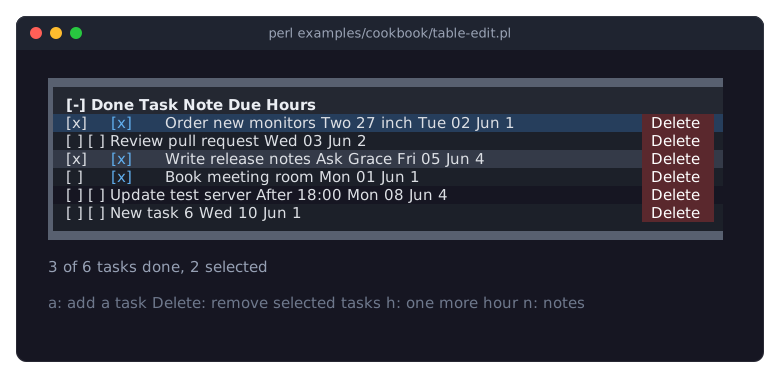
When cell widgets are built
The table builds cell widgets only for the rows of the current page, when they are first shown. It builds a row's cell widgets again when:
the row's data changed (
set_value,update_row, ...), unless the column has anupdate_cell(see below);the column changed (
update_column), or the columns were added, removed, moved, shown or hidden;the table's
selectionmode,cell_padding,tree_columnorchildren_keychanged;the row comes back after it left the page: after a page turn, a filter that hid it, or a closed group or tree row.
So keep what matters in the row data, not in the widget: a widget can be replaced by a new one at these moments, and then shows what the cell code makes of the row data. $table->cell_widget( $id, $key ) returns the widget a cell shows right now (also the default Text), or undef when the row is not on the page or the table has not been drawn since the row was added.
Updating cell widgets instead of rebuilding them
For input widgets, building a new widget for every data change is wrong: the user's focus and what they are typing would be lost, often by a change the input itself made. Give the column an update_cell code reference: the table then keeps the widget when the row's data changes and calls update_cell->( $widget, $cell ) with the existing widget and the new cell context instead. update_cell needs a cell.
use Term::Fabulous::Widget::Checkbox;

{ key => 'done', title => 'Done', filterable => 0,
  cell => sub ($cell) {
	my $box = Term::Fabulous::Widget::Checkbox->new( checked => $cell->{value} ? 1 : 0 );
	my ( $table, $id ) = @{$cell}{qw(table id)};
	$box->on( Change => sub ($event) { $table->set_value( $id, done => $event->value ? 1 : 0 ); return } );
	return $box;
  },
  update_cell => sub ( $box, $cell ) { $box->checked( $cell->{value} ? 1 : 0 ) },
}
Write the input's value back into the row (here with set_value), so that sorting, filtering and the next cell call see it.
Keys and clicks in cell widgets
Focusable widgets in cells are part of the focus order: Tab reaches them, and a click focuses them. While a widget in a cell has the focus, it gets the keys first. Keys it does not use go to the table: Up, Down, PageUp and the other movement keys move the table's cursor and give the focus back to the table. Enter and Space are left to the widget; they do not activate or select the row.
When a cell widget that has the focus goes away, because its row was removed or left the page, or because the cell was built again (see "When cell widgets are built"), the table takes the focus. So a button that deletes its own row leaves the keyboard in the table.
A click on an input widget in a cell (anything focusable or pressable, such as a button, a check box or a text field) goes to that widget. The table moves its cursor to the row and otherwise leaves the click alone: with selection => 'multiple' the selection stays as it is, and a double click does not activate the row. (With 'single', the row is selected, because there the selection follows the cursor.)
Widgets as column titles
A column's header code reference returns the widget of its header cell, instead of the title in bold. It gets the Column object. The sort marker is still shown right of it. The Rating title in the picture under "Column widths" is such a widget:
header => sub ($column) {
	my $box = Term::Fabulous::Widget::Box->new( layout => { child_gap => 1 } );
	$box->add_child(
		Term::Fabulous::Widget::Text->new( text => "\x{2605}", text_color => '#e5c07b' ),
		Term::Fabulous::Widget::Text->new( text => $column->title, bold => 1, text_color => '#ffffff' ),
	);
	return $box;
},
The table builds it again when the column changes. The header styles' background_color and lines apply to the cell as usual; their text color, bold, italic and underline apply only to the default title, so give your widget its own.
FEATURE INDEX
Every table feature, the section of the table guide that explains it, and the names to look for. The exact contract of each name is in the reference: table parameters under CONSTRUCTOR, methods under METHODS and events under EVENTS of Term::Fabulous::Widget::Table, column parameters on Term::Fabulous::Widget::Table::Column, filter options on Term::Fabulous::Widget::Table::Filter and style keys in the list of style keys. Where a recipe of the cookbook shows the feature in a complete program, the entry names it.
- Show rows of Perl hashes
-
"ROWS":
rows,row_id. Recipe: Show a list of hashes in a table. - Name rows by an entry of the row or by code
-
"Row ids":
row_id. - Read rows and cell values
-
"Reading rows":
row,rows,row_ids,has_row,value,display_value. - Change a cell or a row
-
"Changing the data":
set_value,update_row,replace_row. - Add and remove rows
-
"Changing the data":
add_row,add_rows,remove_row,remove_rows,clear_rows. Recipe: Edit the data of a table. - Define columns
-
"COLUMNS":
columns,key,title,type, Term::Fabulous::Widget::Table::Column. - Column widths: fit, fixed, growing, percent
-
"Column widths":
width. Recipe: Size, align and wrap columns. - Align the content of cells
-
"Alignment":
align,header_align. Recipe: Size, align and wrap columns. - Wrap text, rows of different heights
-
"Wrapping and row height":
wrap,width,cell_padding. Recipe: Size, align and wrap columns. - Add, remove, move and change columns
-
"Changing columns":
add_column,remove_column,move_column,update_column. Recipe: Edit the data of a table. - Show and hide columns
-
"Choosing the visible columns":
visible,show_columns,hide_columns,set_visible_columns. - Let the user pick the columns (column chooser)
-
"Choosing the visible columns":
open_column_chooser,close_column_chooser,ColumnsChange. Recipe: Let the user choose the visible columns. - Format values: dates, numbers, sizes, flags
-
"DISPLAY TEXT AND MUTATORS":
mutator, Term::Fabulous::Widget::Table::Mutator. Recipe: Format cells: dates, numbers, sizes and flags. - Computed columns
-
"Computed columns":
value. - Read numbers and dates the way the table does
-
"CELL WIDGETS":
cell,cell_widget. Recipe: Edit the data of a table. - Keep input widgets in cells across data changes
-
"Updating cell widgets instead of rebuilding them":
update_cell. - Focus, keys and clicks in cell widgets
- A widget as a column title
-
"Widgets as column titles":
header. Recipe: Size, align and wrap columns. - Sort by a column
-
"SORTING" in Term::Fabulous::Manual::TableRows:
sort,sort_by,clear_sort,sortable,SortChange. Recipe: Sort rows, also with your own comparison. - Sort by several columns
-
"Sorting by several columns" in Term::Fabulous::Manual::TableRows:
sort,sort_by. - Natural, number and date order
-
"How values are compared" in Term::Fabulous::Manual::TableRows:
compare,type. - Custom sort functions
-
"Custom sort functions" in Term::Fabulous::Manual::TableRows:
compare. Recipe: Sort rows, also with your own comparison. - How groups and tree rows are sorted
-
"Sorting groups and trees" in Term::Fabulous::Manual::TableRows.
- Filter fields under the column titles (filter row)
-
"The filter row" in Term::Fabulous::Manual::TableRows:
filter_row,filter_text,filter_error,FilterChange. Recipe: Let the user filter rows. - Filter from Perl: text, numbers, dates, combinations
-
"Filters from Perl" in Term::Fabulous::Manual::TableRows:
filter,remove_filter, Term::Fabulous::Widget::Table::Filter. Recipe: Filter rows from Perl. - Filter on the raw value or the shown text
-
"Raw value or display text" in Term::Fabulous::Manual::TableRows:
filter_on,on. - Search all columns
-
"Searching all columns" in Term::Fabulous::Manual::TableRows:
search. Recipe: Let the user filter rows. - Filters with groups and trees
-
"Filters with groups and trees" in Term::Fabulous::Manual::TableRows.
- Texts of an empty or fully filtered table
-
"What a filtered table shows" in Term::Fabulous::Manual::TableRows:
empty_text,no_match_text,filtered_row_ids. - Group rows by a column
-
"GROUPING" in Term::Fabulous::Manual::TableRows:
group_by,ungroup. Recipe: Group rows by a column. - Group header labels and looks
-
"Group headers" in Term::Fabulous::Manual::TableRows:
group_label,group_style. - Open and close groups
-
"Opening and closing groups" in Term::Fabulous::Manual::TableRows:
expand_group,collapse_group,Expand,Collapse. - Nested rows (a tree)
-
"TREES" in Term::Fabulous::Manual::TableRows:
children_key,tree_column,tree_expanded. Recipe: Show nested data as a tree. - Open and close tree rows
-
"Opening and closing tree rows" in Term::Fabulous::Manual::TableRows:
expand,collapse,expand_all,Expand,Collapse. - Add and remove child rows
-
"Changing a tree" in Term::Fabulous::Manual::TableRows:
add_rowwithparent,parent_of,children_of. - Load child rows when a row opens (lazy loading)
-
"Loading child rows when a row opens" in Term::Fabulous::Manual::TableRows:
Expand. - Pages and a pager
-
"PAGES" in Term::Fabulous::Manual::TableRows:
page_size,page_sizes,pager,page,PageChange. Recipe: Split many rows into pages. - The cursor
-
"The cursor" in Term::Fabulous::Manual::TableRows:
cursor,cursor_group,scroll_to_row,CursorMove. - Select rows: single or multiple selection
-
"Selection" in Term::Fabulous::Manual::TableRows:
selection,selection_column,selected_ids,SelectionChange. Recipe: Show a list of hashes in a table. - React to Enter or a double click on a row
-
"Activating a row" in Term::Fabulous::Manual::TableRows:
RowActivate. - Colors
-
"Colors" in Term::Fabulous::Manual::TableStyles:
text_color,cursor_color,selected_color, and the other color parameters. - Striped rows
-
"Striped rows" in Term::Fabulous::Manual::TableStyles:
stripe_color. - Where style hashes go
- The keys of style hashes
- Which style wins (precedence)
- Highlight rows or cells, also by their data
-
"Styles of rows and cells" in Term::Fabulous::Manual::TableStyles:
row_style,cell_style,set_row_style,set_cell_style. Recipe: Lines and colors per row, column and cell. - Lines around and between the cells
-
"Lines between and around the cells" in Term::Fabulous::Manual::TableStyles:
border,column_lines,row_lines,header_line. Recipe: Compare the line options of a table. - Tables with colored rows and titles (block frames)
-
"Tables with colored backgrounds" in Term::Fabulous::Manual::TableStyles:
border => 'Outer'. Recipe: A table with colored rows and titles. - Lines of one column, row or cell
-
"Lines of columns, rows and cells" in Term::Fabulous::Manual::TableStyles:
border_top,border_right,border_bottom,border_left,row_linesandcolumn_linesin style hashes. - Space inside the cells
-
"Cell padding" in Term::Fabulous::Manual::TableStyles:
cell_padding. - Hide the column titles or the scrollbar
-
"Parts shown" in Term::Fabulous::Widget::Table:
header,scrollbar. - Size of the table, scrolling
-
"SIZE AND SCROLLING" in Term::Fabulous::Manual::TableStyles:
layout,scrollbar,scroll_to_row. - Keyboard
- Mouse
-
"MOUSE" in Term::Fabulous::Widget::Table:
hover,double_click_seconds. - Events
- A table in a KDL layout file
-
"KDL PROPERTIES" in Term::Fabulous::Widget::Table. Recipe: Describe a table in a KDL layout.
- Print a table without a terminal (reports)
-
"PRINTING A TABLE" in Term::Fabulous::Manual::TableStyles: Term::Fabulous::Static. Recipe: Print a table as a report.
- Many rows, speed, the widget limit
-
"PERFORMANCE" in Term::Fabulous::Widget::Table:
page_size,max_element_count. - The view's lines from Perl (the model)
-
Term::Fabulous::Widget::Table::Model:
model,lines,page_lines.
SEE ALSO
This page is part of Term::Fabulous::Manual. Previous page: Term::Fabulous::Manual::Charts. Next page: Term::Fabulous::Manual::TableRows.
Term::Fabulous::Widget::Table, Term::Fabulous::Widget::Table::Column, Term::Fabulous::Widget::Table::Mutator, Term::Fabulous::Widget::Table::Value, Term::Fabulous::Widget::Table::Model, Term::Fabulous::Cookbook::Tables.