NAME
Term::Fabulous - Full-screen terminal user interfaces with layouts, widgets, keyboard and mouse
SYNOPSIS
use v5.32;
use warnings;
use feature 'signatures';
no warnings 'experimental::signatures';

use Clay::XS qw(sizing_grow CLAY_TOP_TO_BOTTOM);
use Term::Fabulous;
use Term::Fabulous::Widget::Box;
use Term::Fabulous::Widget::Text;
use Term::Fabulous::Widget::TextField;

my $root = Term::Fabulous::Widget::Box->new(
	layout => {
		layout_direction => CLAY_TOP_TO_BOTTOM,
		sizing           => { width => sizing_grow(), height => sizing_grow() },
		padding          => { left => 2, right => 2, top => 1, bottom => 1 },
		child_gap        => 1,
	},
);

my $greeting = Term::Fabulous::Widget::Text->new(
	text       => 'What is your name? (Enter to greet, Ctrl+C to quit)',
	text_color => [ 230, 230, 230, 255 ],
);
my $name = Term::Fabulous::Widget::TextField->new( placeholder => 'Your name' );
$root->add_child( $greeting, $name );

$name->on(
	Submit => sub ($event) {
		$greeting->text( 'Hello, ' . $event->value . '!' );
		return;
	}
);

my $ui = Term::Fabulous->new( root => $root, width => 80, height => 24 );
$ui->interaction->set_focused_widget($name);
$ui->run;    # returns after Ctrl+C, SIGINT, SIGTERM or SIGHUP
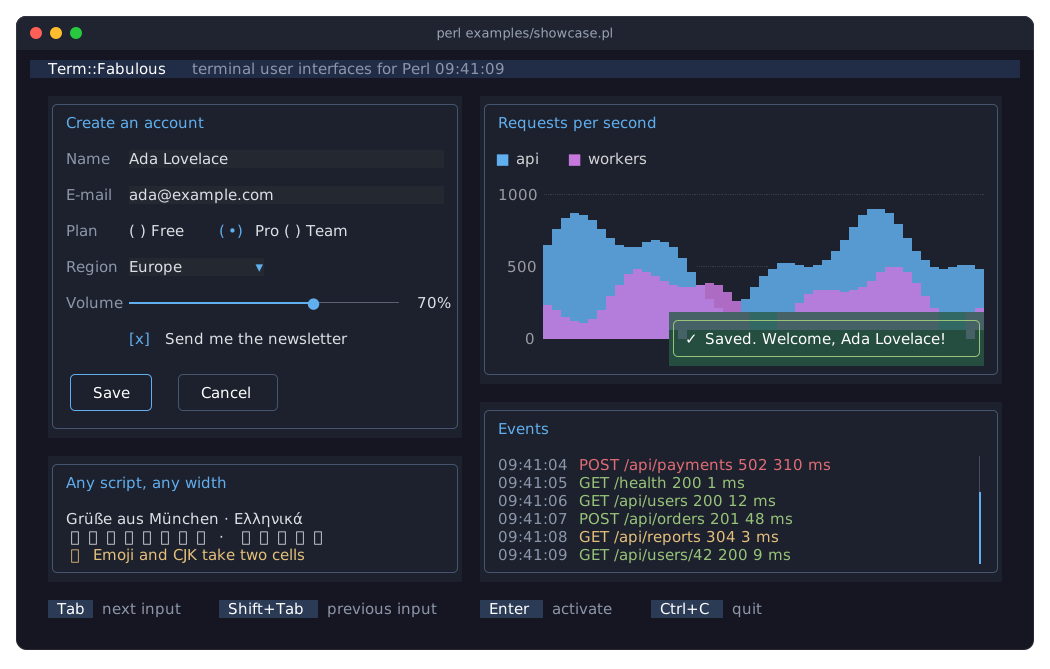
The picture shows examples/showcase.pl, a demo program of the distribution (see Term::Fabulous::Examples):
DESCRIPTION
Term::Fabulous builds full-screen terminal applications in Perl. You describe the screen as a tree of widgets (boxes, text, buttons, input fields, tables, charts, scrollable areas and canvases), in Perl code or in a layout file written in KDL, a small configuration language (https://kdl.dev). Term::Fabulous sizes and positions the widgets with the Clay layout engine, draws them with 24-bit colors through the termbox2 library, and turns key presses, mouse clicks and terminal resizes into events your code reacts to.
Highlights:
Flexible layout: rows and columns, growing, fitting, fixed and percentage sizes, padding, gaps, alignment, borders in 20 styles.
Input widgets for forms: single- and multi-line text with selection, undo and a clipboard shared by all text fields of the program; check boxes; radio buttons; dropdowns; sliders; star ratings; segmented controls.
A table widget for rows of data: sorting by one or several columns, filtering (also by the user, in a filter row), groups and trees that open and close, pages, single and multiple selection, any widget as a cell, and lines and colors per column, row and cell.
Chart widgets that draw themselves from data: line, area, bar and scatter charts with category, numeric, logarithmic and time axes, stacking, curves, transforms and live data; histograms; sparklines; pie, donut, polar area and radar charts; a legend, hover with a
SeriesHoverevent, and palettes for dark and light backgrounds.Keyboard focus with Tab and mouse clicks, readable key names for key bindings (
Ctrl+S,Shift+Left), the kitty keyboard protocol for keys older terminals cannot tell apart, mouse wheel scrolling.Dialogs that open over the screen and keep the keyboard focus inside.
Dividers between widgets, horizontal or vertical, with a text on the line; accordions whose sections open and close under their headers; tabs on any side of a page, with horizontal or downward labels, whose active tab joins the page's border.
Progress bars in several styles, with labels, stripes, stacked segments and an indeterminate runner, and spinners in twelve styles, animated on the application's clock without timers; toasts that appear in a corner and go away by themselves.
Canvases for free drawing, including a half-block pixel canvas with lines, rectangles and circles.
Correct handling of Unicode: wide CJK characters, emoji, combining characters.
A prompt of a few rows below the shell's output instead of the whole screen ("INLINE MODE").
The same widget tree can be printed once as text (with or without colors) for reports and tests, through Term::Fabulous::Static.
Whole programs can be tested without a terminal: a terminal in memory (Term::Fabulous::Terminal::Memory) takes keys, clicks and resizes, and "step" handles them as "run" would.
Runs on IO::Async, so timers, sockets and child processes work alongside the user interface.
This class is the application object: it owns the widget tree, opens the terminal, runs the event loop, draws a frame whenever something changed (checking 30 times per second) and dispatches input events. It is a subclass of Clay::UI. It reaches the terminal through a terminal object (Term::Fabulous::Role::Terminal): the real one by default, or Term::Fabulous::Terminal::Memory in tests, which "step" drives without an event loop.
AI DISCLAIMER
AI has been used in the development of this project, including code generation and documentation. If that is a concern for you, this project may not be for you. Please consider this before using or contributing to the project.
DOCUMENTATION
The documentation has four parts. If you are new to Term::Fabulous, start with the manual's first page and its first program.
- The manual: Term::Fabulous::Manual
-
The user guide. Its first page introduces the library, shows a first program, lists the topic pages and ends with a FEATURE INDEX that maps tasks to the sections, recipes and class pages that describe them. The topic pages explain the concepts, with examples throughout: Term::Fabulous::Manual::Layout (widgets, the widget tree and layout), Term::Fabulous::Manual::Looks (text, colors, borders), Term::Fabulous::Manual::Events (events, keyboard, focus, mouse, scrolling), Term::Fabulous::Manual::Forms (input widgets), Term::Fabulous::Manual::Feedback (progress bars, spinners, toasts, status bars, prompts and file dialogs), Term::Fabulous::Manual::Menus (commands, menu bars, context menus and key references), Term::Fabulous::Manual::Charts (canvases and charts), Term::Fabulous::Manual::Tables, Term::Fabulous::Manual::TableRows and Term::Fabulous::Manual::TableStyles (the table widget), Term::Fabulous::Manual::KDL (layout files), Term::Fabulous::Manual::Programs (event loop, output without a terminal, testing), Term::Fabulous::Manual::CustomWidgets, Term::Fabulous::Manual::Troubleshooting and Term::Fabulous::Manual::Glossary.
- The cookbook: Term::Fabulous::Cookbook
-
Recipes: complete, runnable programs for common tasks, each with a picture and notes on the lines that matter. Its first page lists every recipe; the recipes are on topic pages such as Term::Fabulous::Cookbook::GettingStarted, Term::Fabulous::Cookbook::Forms, Term::Fabulous::Cookbook::Tables and Term::Fabulous::Cookbook::Charts.
- The examples: Term::Fabulous::Examples
-
The example programs of the distribution, with a picture of each: demo programs, a gallery with one program per widget, and the complete programs of the cookbook.
- The class pages
-
One reference page per class, listed by purpose under "MODULES". This page is the reference of the application object: "new", "run", "step" and the other methods, the events it fires, the keys it handles itself, inline mode and wheel scrolling.
REQUIREMENTS
Perl 5.32.1 or later, a C compiler to build Term::Fabulous::Termbox (termbox2 is compiled into the distribution), a terminal with 24-bit colors and a UTF-8 locale. Imager is recommended, for Term::Fabulous::Widget::Image, and Imager::File::SIXEL with it, for Term::Fabulous::Widget::Sixel. See "REQUIREMENTS" in Term::Fabulous::Manual.
CONSTRUCTOR
new
my $ui = Term::Fabulous->new(
	root   => $root_widget,
	width  => 80,
	height => 24,
	mouse  => 1,
);
Creates the application object. The terminal is not touched until "run" (or "step"), so you can create the object, set the focus and add timers first. Unknown parameters die (Unrecognised parameters for Term::Fabulous constructor: 'colour').
root-
Required. The root widget, the top of the widget tree, usually a Term::Fabulous::Widget::Box. It receives every event that no other widget receives: key presses while nothing has the focus, mouse events where no widget is drawn, and every
StartandResize. It must therefore be able to fire events (compose Clay::UI::Role::Events::Emitter, as all Term::Fabulous widgets do); otherwisenewdies (Term::Fabulous: root must consume Clay::UI::Role::Events::Emitter to receive input events, got ...). The root must not have a parent (newdies withClay::UI: 'root' must not have a parent; ...); a widget that was removed from its parent can be a root. A widget tree belongs to one application object (or Term::Fabulous::Static) at a time: a second object with the same root dies withClay::UI: 'root' is already the root of another Clay::UI, as long as the first one exists. width-
Required. A positive number: the width of the layout in columns until the terminal is opened ("run" or "step"). It is then replaced with the terminal's width, and kept up to date when the terminal is resized.
height-
Required. A positive number: the height of the layout in rows until the terminal is opened, then the terminal's height (in inline mode, the rows of the inline region).
inline-
Optional. A whole number of rows, at least 1, or
undef, the default. With a number, "run" does not take over the screen: the user interface is drawn into that many rows below the shell's output and stays there whenrunreturns, like a prompt. See "INLINE MODE". Anything else dies (Term::Fabulous: inline must be a whole number of rows of at least 1, got '0'). mouse-
A boolean. Default: 1, or 0 in inline mode. With 1, the terminal reports mouse clicks, drags, movement and the wheel to the program (see "MOUSE" in Term::Fabulous::Manual::Events). With 0, the terminal keeps the mouse for itself, so the user can select and copy text as usual, and no
MouseorMouseMoveevents are fired. Inline mode has no mouse support:mousewith a true value andinlinetogether die. double_click_seconds-
A number of seconds, at least 0; anything else dies. Default: 0.4. A press of the same button in the same cell as the press just before it, at most this long after it (on the
clock), continues a run of clicks, and any other press starts a new one. TheMouseevent of a double click has a click_count of 2, of a triple click 3; every widget that tells double clicks apart (Term::Fabulous::Widget::Table, Term::Fabulous::Widget::TextField, Term::Fabulous::Widget::TextArea) reads that count. kitty_keyboard-
A boolean. Default: 1. With 1, "run" asks the terminal whether it speaks the kitty keyboard protocol and, if it does, switches the protocol on until
runreturns. The terminal then reports keys the legacy encodings cannot tell apart (Ctrl+I and Tab, Ctrl+Shift+W and Ctrl+W, Escape and the start of Alt plus a key), the Super, Hyper and Meta modifiers, and keys such as F13 to F35, the keypad and media keys; see "THE KITTY KEYBOARD PROTOCOL" in Term::Fabulous::Event::KeyPress. A terminal without the protocol answers that it has none, and the keys are read as before. The question costs one exchange with the terminal whenrunstarts, at most half a second for a terminal that does not answer at all. With 0, the terminal is not asked and the protocol stays off. "kitty_keyboard_active" tells whetherrunuses it. stop_on_ctrl_c-
A boolean, stored as 1 or 0; a reference dies. Default: 1. With 1,
Ctrl+Cstops the loop after itsKeyPresswas fired, so "run" returns. With 0,Ctrl+Cis an ordinary key that a listener can bind, for example to copy, and the program ends some other way, such as a quit key that first asks about unsaved work.SIGINT,SIGTERMandSIGHUPstop the loop either way. terminal-
Optional. The terminal to run on: an object composing Term::Fabulous::Role::Terminal. Default: a new Term::Fabulous::Terminal::Termbox, the real terminal. Pass a Term::Fabulous::Terminal::Memory to test a program without a terminal (see "step" and "TESTING" in Term::Fabulous::Manual::Programs). Anything else dies (
Term::Fabulous: terminal must consume Term::Fabulous::Role::Terminal). clock-
Optional, for tests. A code reference that returns the current time in seconds, default
Time::HiRes::time. Frame pacing reads it: how long a frame took and when it ended (see "run"), and so do "now", the widgets that animate (see "request_frame_at") and the count of a run of clicks (seedouble_click_seconds). A test gives it a clock it controls to check the pacing withstep( paced => 1 )or to move an animation on. Anything but a code reference dies. theme-
Optional. The Term::Fabulous::Theme the widgets draw with: a theme object, or the name of a built-in theme,
dark(the default) orlight. Widgets that were given a color or a border style keep it. Every frame first paints the screen in the theme'sbackgroundtoken, so a theme looks the same on any terminal; a theme whosebackgroundhas alpha 0 leaves the terminal's own background (see "SCREEN BACKGROUND" in Term::Fabulous::Render). "theme" switches the theme at run time. See "THEMES" in Term::Fabulous::Manual::Looks. output_mode-
Optional, and only one value is allowed:
TB_OUTPUT_TRUECOLORfrom Term::Fabulous::Termbox, the default. Any other value dies. Term::Fabulous always draws with 24-bit colors. memory_size-
Optional, rarely needed. The number of bytes Clay reserves for laying out a frame: an integer of at least what
Clay::XS::Clay_MinMemorySize()reports for the UI'smax_element_count(about 6 MB for the default count), which is also the default. It does not raise the limit on the number of widgets;max_element_countdoes. max_element_count-
Optional. The number of Clay elements a frame may hold: a positive integer, default 8192. Every widget is one element and Clay keeps two elements for itself, so the default allows 8190 widgets on the screen at once; a larger tree dies with
Clay::UI: the widget tree has more elements than max_element_count (8192) allows .... Clay also wraps at most this many text lines per frame, counted over every text widget it lays out, and silently stops wrapping past that. Raise it for very large trees; the memory Clay reserves grows with it. See "new" in Clay::UI and "LIMITATIONS". max_measure_text_cache_word_count-
Optional. The number of words Clay's text-measurement cache holds: an integer of at least 32, default twice
max_element_count(16384). Clay measures every text it lays out word by word, visible or not, and keeps the words of the last few frames; a frame whose texts have more words than this dies withClay::UI: the texts laid out in one frame have more words than max_measure_text_cache_word_count (16384) allows .... Raise it for frames with a lot of text, or show long documents with a Term::Fabulous::Widget::VirtualList, which lays out only the part near the viewport. The memory Clay reserves grows with it. See "new" in Clay::UI and "LIMITATIONS". error_handler-
Optional. A code reference Clay calls when it reports an error during layout (for example two widgets with the same id). The default dies with
Clay error: .... See "new" in Clay::UI. measure_text-
Not accepted, although Clay::UI has it: Term::Fabulous always measures text in terminal columns itself, so passing
measure_textdies.
METHODS
run
$ui->run;Opens the terminal in full-screen mode (or inline, see "INLINE MODE"), runs the event loop until it is stopped, and restores the terminal. It returns nothing. A terminal that "step" opened is used as it is, without a second Start, and closed when run returns.
While it runs:
a
Startevent is fired on the root widget as soon as the terminal is open, with its size: from inside the running loop, before the first frame and before any input is read, so aStartlistener can use "loop". Timers and other work the program queued on the loop beforerunmay run before it;every 1/30 second (see "termbox_draw_interval") the screen is laid out and drawn again, using the real terminal size, if anything changed since the last frame: a widget was changed, input arrived, the terminal was resized, "invalidate" was called, or the time a widget asked for a frame at has come ("request_frame_at", how spinners and progress bars animate). Nothing is drawn while nothing happens. A pointer that only moved gets a frame of its own at most every other check when frames take long to draw (longer than the time since the last one ended), so moving the mouse cannot keep the loop busy with nothing but redrawing; clicks, keys and changed widgets are always drawn at the next check;
terminal input is read as soon as it arrives and dispatched as
KeyPress,MouseandMouseMoveevents (see "EVENTS");terminal resizes fire
Resizeon the root widget;everything else you added to the IO::Async::Loop (IO::Async calls these objects notifiers: timers, sockets, child processes, ...) runs as usual.
The loop stops, and run returns, when:
your code calls
$ui->loop->stop;the user presses
Ctrl+C(after itsKeyPresswas fired), unlessstop_on_ctrl_cis 0;the process receives
SIGINT,SIGTERMorSIGHUP.
While run is active it handles these three signals itself; when it returns or dies, %SIG holds again what the program had set for them before, except for a signal that an IO::Async::Signal the program added to the loop still watches.
If code running inside the loop dies (a listener, a timer), run restores the terminal first and then dies with the same error, so the message is readable on the normal screen. The terminal is also restored when code inside the loop calls exit. When the terminal input ends without a SIGHUP reaching the process (a terminal that went away while the process is not in its session, or input from a pipe), run dies with Term::Fabulous: the terminal was closed. After run has returned or died, the object can be used again and run can be called again. While run is active, a second call (from a listener or a timer inside the loop) dies with Term::Fabulous: run is active already; it cannot be called again until it returns and leaves the active run as it was, just as "step" refuses to run inside it.
run dies with the terminal's error when the terminal cannot be opened. For the real terminal, these start with Term::Fabulous::Terminal::Termbox:, for example when the process has no controlling terminal (tb_init failed: No such device or address, or tf_init_inline failed: ... in inline mode), when the terminal reports a size of 0 columns or rows, and in inline mode when the terminal does not report its cursor position within a second (the terminal did not report its cursor position; ...); see "open" in Term::Fabulous::Terminal::Termbox.
When the locale's character set is not UTF-8, the real terminal warns when it opens: Term::Fabulous::Terminal::Termbox: the locale's character set is not UTF-8; wide characters will be misaligned (see "open" in Term::Fabulous::Terminal::Termbox).
run watches the terminal's read_handles with IO::Async and reads the events as soon as one becomes readable. A terminal without handles, and every terminal on Windows, where Perl's select watches only sockets, is asked for its events at a steady rate instead; see "termbox_input_poll_interval".
step
my $frames = $ui->step;
my $frames = $ui->step( paced => 1 );
One turn of "run" without an event loop, for tests: usually with a Term::Fabulous::Terminal::Memory as the "terminal", whose input methods queue keys, clicks and resizes. step
opens the terminal if it is not open yet, sets "width" and "height" to its size and fires
Start, asrundoes (but there is no loop: "loop" is the one of the lastrun, orundef);reads every event that waits and dispatches it exactly as
rundoes: a key to the focused widget (after which Tab and Shift+Tab also move the focus), a mouse event to the widget under the pointer (a press focuses it first), a wheel notch to the scroll box under the pointer; see "EVENTS" and "KEYBOARD AND FOCUS".Ctrl+Cfires itsKeyPressbut has no loop to stop;applies a resize at once, firing the
Resizepair, instead of waiting for the size to settle;draws frames as long as one is due: for a click, one frame for the press and one for the release, and another one when a frame changed widgets (hover and press events fire while a frame is drawn). Without
paced, a frame that only shows pointer motion is drawn at once; withpaced => 1, it waits like inrun(see there), measured with theclockof "new".
Returns the number of frames it drew, 0 when nothing was due. The terminal stays open; run closes it, or close it with $ui->terminal->close. The real terminal (Term::Fabulous::Terminal::Termbox) also closes itself when it is destroyed while open, so a program that steps and then dies or ends gets its shell back as it was. Unknown options die, and so does a call from inside run. When frames keep being due after 100 rounds, because a widget changes in every frame, step dies. When the terminal input has ended ("end_input" in Term::Fabulous::Terminal::Memory), step dies like run.
terminal
my $terminal = $ui->terminal;
$ui->terminal->press_key('Enter');
Returns the terminal object given to "new", or the Term::Fabulous::Terminal::Termbox created by default. Read only.
loop
my $loop = $ui->loop;
$ui->loop->stop;
Returns the IO::Async::Loop of the most recent "run", or undef before the first run; it is set before the Start event fires. Call $ui->loop->stop from a listener or timer to end run. The loop is IO::Async's process-wide loop: the same object that IO::Async::Loop->new returns, which is why notifiers added to IO::Async::Loop->new before run run inside it.
interaction
my $tracker = $ui->interaction;
$ui->interaction->set_focused_widget($widget);
my $focused = $ui->interaction->get_focused_widget;
Returns the Clay::UI::Interaction object of this UI. It holds the keyboard focus and the hover and press state of the widgets. Use it to move the focus from code (set_focused_widget, focus_next, focus_previous) and to ask which widget has it (get_focused_widget). See "FOCUS" in Term::Fabulous::Manual::Events. Inherited from Clay::UI.
root
my $root = $ui->root;Returns the root widget given to "new". Read only.
width
my $columns = $ui->width;
$ui->width(100);
Accessor. Returns the current layout width in columns: the terminal width while "run" is active. Writing sets the layout width from the next frame on and returns the new value; a value that is not a positive number dies. run sets the width to the terminal width when it starts and after every terminal resize, so a written value lasts only until then. Inherited from Clay::UI.
height
my $rows = $ui->height;
$ui->height(40);
Accessor. Returns the current layout height in rows: the terminal height while "run" is active, or the rows of the inline region in inline mode. Writing works like for "width". Inherited from Clay::UI.
inline
my $rows = $ui->inline; # undef for the full screenReturns the inline constructor parameter. Read only.
mouse
my $enabled = $ui->mouse;Returns whether the mouse is reported: the mouse constructor parameter, or its default (1, or 0 in inline mode). Read only.
double_click_seconds
my $seconds = $ui->double_click_seconds;Returns the double_click_seconds constructor parameter, or its default (0.4). Read only.
kitty_keyboard
my $wanted = $ui->kitty_keyboard;Returns the kitty_keyboard constructor parameter, or its default (1). Read only.
stop_on_ctrl_c
my $stops = $ui->stop_on_ctrl_c;Returns the stop_on_ctrl_c constructor parameter as 1 or 0, or its default (1). Read only.
kitty_keyboard_active
my $in_use = $ui->kitty_keyboard_active;Returns 1 while the open terminal uses the kitty keyboard protocol: from the start of "run" (or the first "step"), before Start fires, until the terminal is closed, when the terminal speaks the protocol and kitty_keyboard is 1. Returns 0 otherwise, and always while the terminal is closed. Read only.
output_mode
my $mode = $ui->output_mode; # TB_OUTPUT_TRUECOLORReturns the output_mode constructor parameter, always TB_OUTPUT_TRUECOLOR. Read only.
pointer_state
my $pointer = $ui->pointer_state; # { x => 12, y => 3, down => 0 } or undefReturns where the mouse pointer was last reported: a new hash reference with the cell coordinates x and y and down, which is 1 while the left button is held and 0 otherwise. Returns undef until the first mouse report. The terminal reports every move, so this is the live mouse position as of the last report. Term::Fabulous passes it to Clay with every frame, which derives the hover and press state of the widgets from it. When the button went down and up again between two frames, each state gets a frame of its own, so a click is never too fast to press a widget. down follows the left button only: the release of another button does not end a press.
theme
my $theme = $ui->theme;
$ui->theme('light');
$ui->theme( Term::Fabulous::Theme->from_file('ocean.kdl') );
Accessor for the theme (see "new"). Without an argument it returns the Term::Fabulous::Theme object; with one it sets the theme, a theme object or a built-in name, makes every widget read its colors and border styles again, and draws a frame, screen background included. Anything else dies. See "THEMES" in Term::Fabulous::Manual::Looks.
invalidate
$ui->invalidate;Asks for a frame: the screen is laid out and drawn again at the next tick of the frame timer, even if Term::Fabulous saw no change. Returns the object. Frames are drawn by themselves whenever a widget was changed through its methods, input arrived or the terminal was resized, so most programs never need this; call it when something the frame depends on changed behind Term::Fabulous's back, for example state a custom widget reads while it draws without calling mark_changed (see telling Term::Fabulous that something changed).
now
my $seconds = $ui->now;The current time in seconds on the application's clock: the clock of "new", by default Time::HiRes::time. Widgets that animate read it instead of the system clock, so a test or the screenshot harness can move it; see "request_frame_at".
request_frame_at
$ui->request_frame_at( $ui->now + 0.1 );Asks for a frame at a time on the clock (see "now"): at the first tick of the frame timer at or after it, a frame is drawn as if "invalidate" had been called, and step draws one when the time has come. Several requests keep the earliest time. Every frame forgets the request, so something that animates asks again from the frame it is drawn in. Returns the object. Dies unless the argument is a number.
This is how the widgets that move by themselves (a Term::Fabulous::Widget::Spinner, an indeterminate Term::Fabulous::Widget::ProgressBar) are drawn without timers of their own; see "ANIMATION" in Term::Fabulous::Widget::Display to write one.
find_by_id
my $field = $ui->find_by_id('name');Returns the widget with the given id, searching the whole tree from the root, or undef when there is none; see "find_by_id" in Term::Fabulous::Widget. Dies when the root widget has no find_by_id method (every Term::Fabulous widget has one).
termbox_draw_interval
my $seconds = $ui->termbox_draw_interval; # 1/30Returns the time between two checks for a due frame in seconds: 1/30. A frame is drawn at a tick only when something changed since the last one. Read only.
termbox_resize_debounce_interval
my $seconds = $ui->termbox_resize_debounce_interval; # 1/10Returns how long, in seconds, the terminal size must stay unchanged before a resize is applied and the Resize events are fired: 1/10. While a resize is pending, no frames are drawn. Read only.
termbox_input_poll_interval
my $seconds = $ui->termbox_input_poll_interval; # 1/60Returns the time between two polls of the terminal for events in seconds: 1/60. run polls when the terminal's handles cannot be watched, which is always the case on Windows (see "run"); elsewhere it waits for the handles to become readable and never polls. Read only.
draw
$ui->draw;Lays out and draws one frame immediately, into the cell target of the "terminal". run calls it whenever a frame is due, so programs do not need it; see "invalidate" to ask for a frame instead. With the real terminal, it only has a visible effect while the terminal is open. See "draw" in Term::Fabulous::Render.
bounding_box, content_box, scroll_state, scroll_to
my $box   = $ui->bounding_box($widget);       # { x, y, width, height } in cells, or undef
my $inner = $ui->content_box($widget);        # the same inside padding, border and scrollbars
my $state = $ui->scroll_state($scroll_box);   # { position, viewport, content }
$ui->scroll_to( $scroll_box, { y => -10 } );  # ten rows down from the top
bounding_box returns where the last frame placed a widget, and content_box the part of that box inside the padding the frame declared, which in Term::Fabulous holds the border and the scrollbars too. scroll_state and scroll_to read and set the scroll position of a scroll container such as a Term::Fabulous::Widget::ScrollBox, in cells: 0 at the top and left, negative when scrolled down or right. Term::Fabulous::Scrolling scrolls by rows, pages and to the ends and reports the position as positive rows (scroll_offset), so a program need not flip the sign. Inherited from Clay::UI; see "bounding_box" in Clay::UI, "content_box" in Clay::UI, "scroll_state" in Clay::UI and "scroll_to" in Clay::UI, and the recipe Scroll a ScrollBox from code.
after_draw, each_draw
$ui->after_draw( sub { ... } );
$ui->after_draw( sub ($widget) { ... }, owner => $widget );
$ui->each_draw( sub ($widget) { ...; return $done }, owner => $widget, name => 'retry', frames => 4 );
after_draw queues a code reference to call once after the next frame has been drawn, for work that needs the layout of that frame; each_draw registers one to call after every frame until it returns true, its frames ran out, its owner was freed or left the UI, it died, or a later registration with the same name (and the same owner, or none) replaced it. With an owner, the UI holds the widget weakly and passes it in. See "after_draw" in Term::Fabulous::Render and "each_draw" in Term::Fabulous::Render; widgets use "each_frame" in Term::Fabulous::Widget.
Other inherited methods
The class inherits further methods from Clay::UI (render, widget_for, measure_text, max_element_count, max_measure_text_cache_word_count, laid_out_revision), from Term::Fabulous::Render (last_frame, the Term::Fabulous::Render::Frame of the last frame, and clip_rect) and from Term::Fabulous::Render::Canvas (invalidate_canvases). cell_target returns the cell target of the "terminal". Applications rarely need them; they are documented on those pages.
EVENTS
"run" and "step" fire these events. Each one bubbles from the widget it is fired on to the root, as described in "Return values and bubbling" in Term::Fabulous::Manual::Events.
KeyPress(Term::Fabulous::Event::KeyPress)-
For every key press, on the focused widget, or on the root widget when nothing has the focus.
Mouse(Term::Fabulous::Event::Mouse)-
For every mouse report with a button or the wheel (button press, release, drag, wheel), on the topmost widget that drew something in the cell under the pointer in the last frame: its background, its border or its canvas. Text widgets are skipped, and so are widgets that draw nothing there. When no widget qualifies, the event is fired on the root widget. Content that is scrolled out of view in a Term::Fabulous::Widget::ScrollBox is not drawn and never receives the event.
TextClick(Term::Fabulous::Event::TextClick)-
For every button press (not a drag) whose cell holds a character of a text that is the topmost thing drawn there, on the Term::Fabulous::Widget::Text, after the
Mouseevent. A left press on a link of a Term::Fabulous::Widget::Text then firesLinkActivate(Term::Fabulous::Event::LinkActivate) on it. See "Clicks on text and links" in Term::Fabulous::Manual::Events. MouseMove(Term::Fabulous::Event::MouseMove)-
For every report of the pointer moving with no button held, on the same widget a
Mouseevent would go to. The hover state of the widgets, and the hovered link of a Term::Fabulous::Widget::Text, follow these moves. Start(Term::Fabulous::Event::Start)-
On the root widget, once each time the terminal is opened (by "run", or by the first "step"), after
widthandheighthold its size and before the first frame. Resize(Term::Fabulous::Event::Resize)-
On the root widget, twice per resize: first with
is_pre_eventtrue, before the new size is applied, then withis_post_eventtrue, after it. Resizes are debounced (see "termbox_resize_debounce_interval"), and a size with zero columns or rows is ignored. The starting size firesStartinstead; see Term::Fabulous::Event::Resize.
Widgets fire further events themselves: Change and ValidityChange from the input widgets, Submit from Term::Fabulous::Widget::TextField, Change and Submit from Term::Fabulous::Widget::ColorPicker, Activate from Term::Fabulous::Widget::Button, Close from Term::Fabulous::Widget::Dialog, Answer from Term::Fabulous::Widget::Prompt and Term::Fabulous::Widget::FileDialog, Choose from Term::Fabulous::Widget::Menu, Select from accordions, tabs and Term::Fabulous::Widget::DocumentTabs, which also fires TabClose and TabAdd, CanvasResize from canvases, SeriesHover from charts, the table events (CursorMove, SelectionChange, RowActivate, SortChange, FilterChange, PageChange, Expand, Collapse, ColumnsChange) from Term::Fabulous::Widget::Table, and Clay::UI's OnPress, OnRelease, OnHoverStart, OnHoverStopped, OnFocus, OnBlur and OnScroll. The complete list is in "Event reference" in Term::Fabulous::Manual::Events.
KEYBOARD AND FOCUS
Three keys have a fixed meaning. Their KeyPress is fired first, like for any other key, and then:
Ctrl+C-
stops the loop, so "run" returns. With
stop_on_ctrl_c => 0(see "new") it is an ordinary key: itsKeyPressis all that happens. Tab-
moves the focus to the next widget that can take it, in tree order, wrapping around at the end. An open Term::Fabulous::Widget::Dialog keeps the focus among its own widgets, and a container can set an order of its own (see "Custom focus order" in Term::Fabulous::Manual::Events).
Shift+Tab(key nameBackTab)-
moves the focus to the previous one, in the same order.
A focused widget that has a captures_tab method returning true keeps Tab and Shift+Tab for itself: the focus does not move, and the widget's own key handling decides what the keys do (a code editor indents with them). See "Keys Term::Fabulous handles itself" in Term::Fabulous::Manual::Events.
Listeners cannot prevent these actions.
When the left mouse button is pressed (not dragged), the widget under the pointer (on text, the Text widget) gets the focus, or its nearest ancestor that can take it. When there is none, the focus is cleared, so clicking an empty area leaves a text field and closes an open dropdown. This happens before the Mouse event is fired. A widget that has a keeps_focus_on_click method returning true, or that is inside such a widget, leaves the focus where it is when it is pressed: a click on the title of a Term::Fabulous::Widget::MenuBar opens the menu without taking the focus from the text field the user was typing in, so the menu can give it back when it closes.
When the focused widget is removed from the tree, disabled or hidden, the focus goes to its heir: the nearest widget above it that can take the focus, unless a container on the way names another with focus_heir (a Tabs names its active tab, a closing Accordion::Item its header). See "When the focused widget goes away" in Term::Fabulous::Manual::Events.
See "KEYBOARD" in Term::Fabulous::Manual::Events and "FOCUS" in Term::Fabulous::Manual::Events.
INLINE MODE
my $ui = Term::Fabulous->new( root => $root, width => 80, height => 3, inline => 3 );
$ui->run;
say 'Done.';    # printed below the region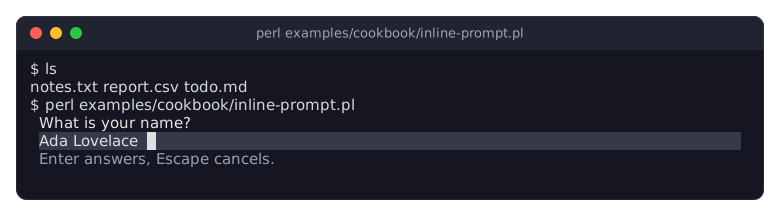
The picture shows the recipe Ask for input below the shell's output, a complete program that asks for a name in three rows below the shell's output.
With inline set to a number of rows, "run" leaves the screen as it is and draws the user interface into that many rows, starting at the line of the cursor (the line below it when text precedes the cursor on its line). The layout is as wide as the terminal and as high as the region; "height" and the Start and Resize events report the region's rows. A region taller than the terminal gets the terminal's height.
When the region does not fit below the cursor, the terminal scrolls up first, as if lines had been printed. The rows of the region are erased before the first frame.
When
runreturns, it first draws a frame if one is due, so a change made by the listener that stopped the loop is shown. That frame stays on the screen (whenrundies, the last frame drawn before), and the cursor goes to the line below it, where the shell or the program's own output continues.When the terminal is resized, Term::Fabulous asks the terminal where the region is now (between frames the hidden cursor waits at the start of its first row), erases from there down and draws the region again.
The mouse is not available (see "new").
The terminal must answer the cursor position query
ESC [ 6 n, as xterm-compatible terminals do; Term::Fabulous asks whenrunstarts and after every resize.
Like in full-screen mode, printing to STDOUT while run is active writes over the user interface.
MOUSE WHEEL SCROLLING
Each notch of the mouse wheel scrolls the scroll box under the pointer (for example a Term::Fabulous::Widget::ScrollBox) by three rows, and each notch of a horizontal wheel (or a sideways tilt of the wheel) by three columns. Notches that arrive between two frames are added up and applied when the next frame is drawn. A Mouse event is fired for every notch, before the notch is counted: when a listener calls use_wheel on it ("use_wheel" in Term::Fabulous::Event::Mouse), the notch scrolls no scroll box; what the listener returns does not matter for this. Widgets that scroll themselves, like Term::Fabulous::Widget::TextArea, use the notches they scroll by, so the scroll box around them stays put while they can still scroll.
MODULES
Every module has its own page. They are grouped here by purpose; the modules marked "used internally" are documented for people who extend Term::Fabulous, and programs do not use them directly.
Application
- Term::Fabulous
-
The interactive application object, described on this page.
- Term::Fabulous::Static
-
Renders a widget tree once, as text, without opening the terminal; for reports, command-line output and tests.
- Term::Fabulous::Layout
-
Builds a widget tree from a KDL layout file, and documents the layout file format.
- Term::Fabulous::Terminal::Memory
-
A terminal in memory: test a whole program, keys, clicks and what the screen shows, with "step".
- Term::Fabulous::Commands, Term::Fabulous::Command
-
The program's commands in one table: a label, the keys and the code of each, which the keys run and the menus show.
Widgets
- Term::Fabulous::Widget::Box
-
The general container, with layout options, a background and a border.
- Term::Fabulous::Widget::Text
-
Shows text, wrapped and aligned. Its spans set bold, colors and other styles on ranges of it, from markup such as
[bold]Enter[/], highlights mark search matches over them, and the user follows its links with a click or the keyboard. - Term::Fabulous::Widget::Button
-
A box that can take the keyboard focus, shows when it is focused or pressed, and fires
Activatefor a click, Enter or Space. - Term::Fabulous::Widget::Dialog
-
A box that opens over the whole screen, keeps the keyboard focus inside itself and closes on Escape.
- Term::Fabulous::Widget::Prompt
-
A dialog that asks a question, with a message, fields and buttons, and reports the answer. In one call: an alert, a question with OK and Cancel, or a request for one value.
- Term::Fabulous::Widget::MenuBar
-
A row of menus at the top of the screen, opened with the mouse, F10 or Alt and a letter.
- Term::Fabulous::Widget::Menu
-
A list of commands with their keys: a context menu that opens at the pointer or below a widget, the menus of a menu bar, or a list of actions on its own.
- Term::Fabulous::Widget::KeyReference
-
A dialog that lists the keys of a program and what they do, in groups, made from a command table and further rows, with a search field.
- Term::Fabulous::Widget::FileDialog
-
A dialog that asks for a file to open, a name to save under, or a folder: a list of the folder's entries, a field for a name or a path, filters and hidden files, and a question before a file is replaced.
- Term::Fabulous::Widget::ScrollBox
-
A box whose content can be larger than the box and scrolls with the mouse wheel and its scrollbars.
- Term::Fabulous::Widget::VirtualList
-
A ScrollBox for thousands of items, the paragraphs of a long document say: it builds and lays out only the items near the viewport, with spacers standing in for the rest.
- Term::Fabulous::Widget::DocumentView
-
A VirtualList that shows a Term::Fabulous::Document: headings, paragraphs with bold, italic and code marks, lists, quotes and code blocks in the styles of the theme, scrolled with the keys, its links selected and followed, its text searched. The main pane of a reader for any documentation format (see "Documents").
- Term::Fabulous::Widget::CodeBlock
-
Lines of code on a background of their own, never wrapped, cut at the edge and scrolled sideways, each character in the style a highlighter gives it.
- Term::Fabulous::Widget::Scrollbar
-
The scrollbar of a scroll container: a track with a thumb that shows the visible part, scrolled by clicking and dragging. ScrollBox and Table make their own; place one yourself for another layout.
- Term::Fabulous::Widget::Divider
-
A horizontal or vertical line between widgets, with an optional text at its start, center or end.
- Term::Fabulous::Widget::Accordion, Term::Fabulous::Widget::Accordion::Item
-
Sections with headers that open and close, one at a time or several, with the keyboard and the mouse.
- Term::Fabulous::Widget::Tabs, Term::Fabulous::Widget::Tabs::Page
-
Pages behind a row of tabs on any side, with horizontal or downward labels; the active tab joins the page's border. Term::Fabulous::Widget::Tabs::Bar and Term::Fabulous::Widget::Tabs::Button are the bar and its tabs, also usable on their own; Term::Fabulous::Widget::Tabs::Line is the line that joins the bar to the page, used internally.
- Term::Fabulous::Widget::DocumentTabs
-
A row of tabs for the open documents of a program, with marks for unsaved changes and errors, close marks and a
+button. The program gives it the tabs and answers its events. - Term::Fabulous::Widget::Canvas
-
A box with a grid of character cells that you draw into.
- Term::Fabulous::Widget::PixelCanvas
-
A canvas that draws pixels, two per cell, with lines, rectangles and circles.
- Term::Fabulous::Widget::Image
-
A picture (PNG, JPEG, GIF, ...) from a file, bytes, base64 text or a data URL, drawn in pixels two per cell and scaled to fit. Needs Imager; without it, the widget shows a notice in its place.
- Term::Fabulous::Widget::Sixel
-
A picture like Image's, drawn by the terminal in its own pixels as sixel graphics. Needs Imager, Imager::File::SIXEL and a terminal that shows sixel graphics; otherwise, the widget shows a notice in its place.
- Term::Fabulous::Widget
-
The abstract base class of all widgets except Text. Its page describes the constructor parameters and methods they all share.
- Term::Fabulous::Widget::Display
-
The abstract base class of the widgets that paint themselves from their own state (the divider, the progress bar, the charts, the scrollbar, the input widgets), with the animation helpers; derive from it to write your own.
- Term::Fabulous::Widget::Element, Term::Fabulous::Widget::TextNode
-
The Clay::UI roles behind Term::Fabulous::Widget and Term::Fabulous::Widget::Text. Used internally.
- Term::Fabulous::Widget::Dialog::Backdrop
-
The layer behind an open dialog. Used internally by the dialog.
- Term::Fabulous::Widget::FileDialog::FolderLine
-
The line of a file dialog that shows the end of the folder's path. Used internally by the file dialog.
Input widgets
- Term::Fabulous::Widget::TextField
-
A single line of text input, optionally masked for passwords.
- Term::Fabulous::Widget::TextArea
-
Text input of several lines, wrapped or scrolled sideways.
- Term::Fabulous::Widget::Checkbox
-
A box the user checks and unchecks.
- Term::Fabulous::Widget::RadioGroup
-
A group of radio buttons of which one is selected; it takes the focus for its buttons.
- Term::Fabulous::Widget::RadioButton
-
One choice inside a radio group.
- Term::Fabulous::Widget::Dropdown
-
One choice from a list that opens over the other widgets.
- Term::Fabulous::Widget::Slider
-
A number from a range, chosen by moving a thumb.
- Term::Fabulous::Widget::StarRating
-
A number of stars, whole or half, chosen with the keys or a click, or read-only.
- Term::Fabulous::Widget::SegmentedControl
-
One choice of a few options shown side by side as one bar.
- Term::Fabulous::Widget::ColorPicker
-
A color, typed into a field, set with RGB or HSL sliders, or picked from a list of named swatches.
- Term::Fabulous::Widget::Input
-
The base class of the input widgets; derive from it to write your own.
- Term::Fabulous::Widget::TextInput
-
The base class of TextField and TextArea, with the editing keys and mouse selection.
- Term::Fabulous::Editor
-
The text, cursor, selection, undo history and clipboard behind the text inputs, without any drawing.
- Term::Fabulous::TextView
-
How the text inputs lay an editor's text out in rows: wrapping, scrolling, the cell of the cursor and the text under a click.
- Term::Fabulous::Viewport
-
The arithmetic of a scrolled view: how far it can scroll, the offset that shows a row, the thumb of a scrollbar.
- Term::Fabulous::Widget::Dropdown::List
-
The list an open dropdown shows. Used internally by the dropdown.
Feedback widgets
- Term::Fabulous::Widget::ProgressBar
-
How much of a task is done: a bar in several styles, with a label, stripes, segments, or a runner for a task of unknown extent.
- Term::Fabulous::Widget::Spinner
-
That something is going on: frames cycling next to a label, in twelve styles of one cell to three rows, or frames of your own.
- Term::Fabulous::Widget::Toast
-
A notification of a kind (info, success, warning, danger) that appears in a corner, stacks with the others there and goes away by itself; in the layout, an alert box.
- Term::Fabulous::Widget::Toast::Stack
-
The column of toasts in one corner. Used internally by the toast.
- Term::Fabulous::Widget::StatusBar
-
One row for a message of a kind, which may go away by itself, and short texts about the program's state on the right.
Tables
- Term::Fabulous::Widget::Table
-
Rows and columns of data, with sorting, filtering, grouping, trees, pages, selection and widgets as cells. The guide to tables starts at Term::Fabulous::Manual::Tables, which has a feature index of its own.
- Term::Fabulous::Widget::Table::Column
-
What a table column shows and how: its parameters in full.
- Term::Fabulous::Widget::Table::Mutator
-
Ready-made mutators that format cell values: dates, numbers, sizes, durations, flags, lookups.
- Term::Fabulous::Widget::Table::Filter
-
Filter conditions on numbers, dates and text, their combinations, and the notation of the filter row.
- Term::Fabulous::Widget::Table::Value
-
How tables read numbers and dates; natural sorting.
- Term::Fabulous::Widget::Table::Model
-
The rows of a table and the lines it shows, without widgets.
- Term::Fabulous::Widget::Table::Style, Term::Fabulous::Widget::Table::Borders
-
How a table checks its style hashes and works out its grid lines. Used internally by the table.
- Term::Fabulous::Widget::Table::Cell, Term::Fabulous::Widget::Table::Toggle, Term::Fabulous::Widget::Table::Grid, Term::Fabulous::Widget::Table::EdgeView, Term::Fabulous::Widget::Table::Pager, Term::Fabulous::Widget::Table::ColumnChooser
-
The widgets a table is built of: cells, the open and close markers, the grids, the header, the page controls and the column chooser (the scrollbar is a Term::Fabulous::Widget::Scrollbar). Used internally by the table.
- Term::Fabulous::Widget::Table::Frame
-
The frame that widgets showing a list put around their table, drawn in the accent while the table has the focus. Used internally.
Charts
- Term::Fabulous::Widget::Chart
-
What all charts share: title, legend, palettes and themes, colors, hover and the
SeriesHoverevent. - Term::Fabulous::Widget::XYChart
-
The reference for charts with an x and a y axis: series and their data forms, axes, stacking, curves, rendering styles, transforms, live data.
- Term::Fabulous::Widget::LineChart, Term::Fabulous::Widget::AreaChart, Term::Fabulous::Widget::BarChart, Term::Fabulous::Widget::ScatterPlot
-
The XY charts, each with its default series type: lines, filled areas, bars, and points with trend lines.
- Term::Fabulous::Widget::Histogram
-
How values are distributed: counts in bins.
- Term::Fabulous::Widget::Sparkline
-
A chart without axes, one row high.
- Term::Fabulous::Widget::PieChart, Term::Fabulous::Widget::DonutChart, Term::Fabulous::Widget::PolarAreaChart
-
Parts of a whole as slices.
- Term::Fabulous::Widget::RadarChart
-
Several values per series on axes around a center.
- Term::Fabulous::Role::HasSeries
-
Adding, changing and removing the series of a chart and their data.
- Term::Fabulous::Chart::Transform, Term::Fabulous::Chart::Curve, Term::Fabulous::Chart::Easing
-
Steps that prepare the data of a series; the curves between points and their easing functions.
- Term::Fabulous::Chart::Palette, Term::Fabulous::Chart::Format, Term::Fabulous::Chart::Marker
-
Palettes and ink colors; number and date labels; the character sets charts draw with.
- Term::Fabulous::Chart::Scale, Term::Fabulous::Chart::Scale::Linear, Term::Fabulous::Chart::Scale::Log, Term::Fabulous::Chart::Scale::Time, Term::Fabulous::Chart::Scale::Category
-
The scales of chart axes: what they have in common, and numeric, logarithmic, date and time, and category axes.
- Term::Fabulous::Chart::Raster, Term::Fabulous::Chart::Surface, Term::Fabulous::Chart::Radial, Term::Fabulous::Chart::Series
-
The machinery behind the charts: subpixel drawing, the cells of a chart while it is drawn, the geometry of round charts and the series object; for charts of your own.
Events
- Term::Fabulous::Event::KeyPress
-
A key was pressed. Provides readable key names for key bindings.
- Term::Fabulous::Event::Mouse
-
A mouse button was pressed or released, the mouse was dragged, or the wheel was turned.
- Term::Fabulous::Event::MouseMove
-
The mouse pointer moved with no button held.
- Term::Fabulous::Event::Start
-
The terminal is open and its size is known.
- Term::Fabulous::Event::Resize
-
The terminal changed size.
- Term::Fabulous::Event::CanvasResize
-
A canvas got a new size from the layout.
- Term::Fabulous::Event::ViewChange
-
What a document view shows has changed: the blocks in view, the section, the percentage, the selected link and the search.
- Term::Fabulous::Event::Change
-
The user changed the value of an input widget.
- Term::Fabulous::Event::ValidityChange
-
The value of an input widget became valid or invalid.
- Term::Fabulous::Event::Submit
-
The user pressed Enter in a text field.
- Term::Fabulous::Event::Activate
-
The user activated a button, by click or key.
- Term::Fabulous::Event::TextClick
-
A mouse button was pressed on a character of a text; says which character, word, spans and link.
- Term::Fabulous::Event::LinkActivate
-
The user followed a link of a Text, by click or key.
- Term::Fabulous::Event::Close
-
A dialog was closed, a toast went away, or a popup menu closed.
- Term::Fabulous::Event::Answer
-
A prompt or a file dialog was answered: which button, and the values of its fields or the chosen path.
- Term::Fabulous::Event::Choose
-
An item of a menu was chosen.
- Term::Fabulous::Event::Select
-
The user opened or closed an item of an accordion, or chose a tab.
- Term::Fabulous::Event::TabClose
-
The user asked to close a document tab.
- Term::Fabulous::Event::TabAdd
-
The user asked for a new document tab.
- Term::Fabulous::Event::SeriesHover
-
The pointer moved onto another series, point or slice of a chart.
- Term::Fabulous::Event::CursorMove
-
The cursor of a table moved to another line.
- Term::Fabulous::Event::SelectionChange
-
The user changed which rows of a table are selected.
- Term::Fabulous::Event::RowActivate
-
The user pressed Enter on a table row or double-clicked it.
- Term::Fabulous::Event::SortChange
-
The user changed how a table is sorted.
- Term::Fabulous::Event::FilterChange
-
The user typed into a filter field of a table.
- Term::Fabulous::Event::PageChange
-
The user turned the page of a table or chose another page size.
- Term::Fabulous::Event::Expand, Term::Fabulous::Event::Collapse
-
The user opened or closed a tree row or a group of a table.
- Term::Fabulous::Event::ColumnsChange
-
The user showed or hid a table column in the column chooser.
Documents
The document view shows a document: a list of widgets, the common ones made by the document's factories from text and marks, any other added as it is. A parser fills the document, and the view shows, searches and links it. Pod::Fabulous reads POD this way. Term::Fabulous::Cookbook::Documents has recipes for documents, from a Markdown reader built on Markdent to links and search, and Term::Fabulous::Cookbook::DocumentTechniques continues with a table of contents, syntax highlighting, styles, pager keys and tables and pictures inside a document.
- Term::Fabulous::Document
-
A document as a list of widgets with the options a view lays them out with: factories for headings, paragraphs, list items, terms, code and rules, its sections and anchors, and searching its text.
- Term::Fabulous::Document::Look
-
The styles the kinds of marks are shown in, as palette tokens of the theme.
- Term::Fabulous::Role::Searchable
-
The texts a widget shows, for search and highlights, also those it builds only later or does not show (a table's other pages).
- Term::Fabulous::Role::SearchContainer
-
A container that lists the searchable widgets it holds, also those out of view, and shows the one with a match: tabs and accordion items.
- Term::Fabulous::Scrolling
-
Scroll any container by rows, by pages, to its ends and to a range of rows, as a pager does.
Colors, borders and text
- Term::Fabulous::Color
-
Color values: parsing color strings, converting between RGB and HSL, making colors lighter, darker or mixed.
- Term::Fabulous::Enum::WebColor
-
The 148 CSS named colors (
Tomato,SteelBlue, ...) as Term::Fabulous::Color objects. - Term::Fabulous::Enum::BorderStyle
-
The 20 border styles and their characters.
- Term::Fabulous::Role::HasBorderStyle
-
The per-side border styles of a widget and how borders take space.
- Term::Fabulous::OptionList, Term::Fabulous::Role::HasOptions, Term::Fabulous::Roving
-
The options of a dropdown or a segmented control and the one selected; how such a widget takes its options from a layout; which entry an arrow key moves to.
- Term::Fabulous::Range, Term::Fabulous::Role::HasRange
-
A value in a range on a grid of steps (snapping, keys, formats), behind the slider, the star rating and the progress bar; and how such a widget takes its range from a layout in one piece.
- Term::Fabulous::Validator, Term::Fabulous::Role::Validatable
-
The checks behind the
validatorandrequiredparameters of the inputs: e-mail addresses, numbers in a range, patterns, your own code; and the role that gives a widgeterror,is_validandvalidate. - Term::Fabulous::Unicode
-
How many terminal columns a piece of text takes, and how text is made safe for the terminal.
- Term::Fabulous::Text::Style
-
Style strings such as
bold red on #202020and the style hashes behind the spans of a Text. - Term::Fabulous::Text::Markup
-
The
[bold red]text[/]markup of a Text. - Term::Fabulous::Text::Marks, Term::Fabulous::Role::MarkedText
-
The spans, highlights and links of one text, checked and cut into styled runs in one place, and the role through which Text and CodeBlock share the spans and highlights. Used internally.
Themes
- Term::Fabulous::Theme
-
The colors, border styles and borders of every widget family: the built-in
darkandlightthemes, themes made in Perl and theme files. - Term::Fabulous::Theme::Document
-
A theme file as a document: its mistakes with their lines, and changes to its settings that keep its comments and layout.
- Term::Fabulous::ThemeEditor
-
The theme editor, with a live preview of every widget family (or of your own screens); the program
fabulous-theme-editorstarts it from the shell. Its parts, used internally, are Term::Fabulous::ThemeEditor::UI, Term::Fabulous::ThemeEditor::Tab, Term::Fabulous::ThemeEditor::Form, Term::Fabulous::ThemeEditor::SettingsList, Term::Fabulous::ThemeEditor::Preview, Term::Fabulous::ThemeEditor::KdlArea and Term::Fabulous::ThemeEditor::ValueDialog. Its menu bar, tab strip, status bar, questions, file dialogs, key reference and color picker are the library's own Term::Fabulous::Widget::MenuBar, Term::Fabulous::Widget::DocumentTabs, Term::Fabulous::Widget::StatusBar, Term::Fabulous::Widget::Prompt, Term::Fabulous::Widget::FileDialog, Term::Fabulous::Widget::KeyReference and Term::Fabulous::Widget::ColorPicker.
Extending Term::Fabulous
These modules matter only if you write widget classes that can be built from layout files, or your own terminal or output class.
- Term::Fabulous::Role::CanParseLayout
-
Makes a widget class usable in KDL layout files.
- Term::Fabulous::Role::Themed
-
How a widget reads its colors, border styles and borders from the theme, and the theme it draws with (
drawing_theme); composed by every widget. - Term::Fabulous::Placement
-
Where a popup goes on the screen: below, above or at its anchor, kept on the screen; the z_index of popups.
- Term::Fabulous::Role::Popup
-
Floats a widget from the root at the position Placement works out and moves it back when a frame moved it; composed by the dropdown's list, popup menus and the table's column chooser.
- Term::Fabulous::Check
-
Checks the values of widget properties, with one wording for each kind of value.
- Term::Fabulous::Role::Terminal
-
What the application object needs from a terminal; write your own terminal with it.
- Term::Fabulous::Terminal::Termbox
-
The real terminal, through termbox2: the default terminal.
- Term::Fabulous::Terminal::Termbox::Cells
-
Sends the drawn cells to the terminal. Used internally by the real terminal.
- Term::Fabulous::Termbox
-
The termbox2 library itself, compiled into the distribution: the
tb_*functions andTB_*constants, and the width functions Term::Fabulous::Unicode measures with. - Term::Fabulous::Termbox::Event
-
One termbox2 input event, as
tb_peek_eventfills it. - Term::Fabulous::Render
-
The role that draws a laid-out widget tree; composed by Term::Fabulous and Term::Fabulous::Static.
- Term::Fabulous::Render::Frame
-
What one frame paints: the paint order, the clip rect of every command (the visible part of scroll containers) and the cells every command paints, for drawing and for finding the widget under the mouse.
- Term::Fabulous::Render::Target::Grid
-
Collects the drawn cells in memory.
- Term::Fabulous::Render::Target::Mask
-
The base role of the cell targets: lets a frame keep cells of the previous frame, so unchanged canvases are not drawn again.
- Term::Fabulous::Render::Target::Sixel
-
The optional role of the cell targets that show sixel pictures: they report the size of a cell in pixels and are handed the pictures of every frame.
- Term::Fabulous::Render::Rectangle, Term::Fabulous::Render::Border, Term::Fabulous::Render::Text, Term::Fabulous::Render::Canvas
-
Draw backgrounds, borders, text and canvases; the canvas painter sends only the changed cells when possible.
- Term::Fabulous::Render::Attr
-
Converts colors into termbox2 color values.
- Term::Fabulous::Render::Geometry
-
Converts Clay's layout boxes into terminal cells.
WINDOWS
Term::Fabulous runs on Windows, in Windows Terminal and in a console window, through termbox2's console backend ("WINDOWS" in Term::Fabulous::Termbox, "WINDOWS" in Term::Fabulous::Terminal::Termbox). Keys, the mouse, resizes and 24-bit colors work as elsewhere; the console is switched to UTF-8 while a program runs, whatever the locale. There is no kitty keyboard protocol and no sixel graphics, and run polls the terminal for events (see "termbox_input_poll_interval") instead of waiting for its handles, because Perl's select watches only sockets there. IO::Async cannot watch signals on Windows, so run does not stop on SIGTERM, SIGINT or SIGHUP there; Ctrl+C arrives as a key while the terminal is open and stops run through "stop_on_ctrl_c".
LIMITATIONS
A frame lays out and draws the whole screen, whatever changed. Only the cells that changed are sent to the terminal, but a very large widget tree costs CPU time on every frame it needs: every attached widget is declared to Clay in every frame, visible or not. Show long lists and documents with a Term::Fabulous::Widget::VirtualList, which attaches only the items near the viewport.
Without the kitty keyboard protocol (see "new"),
Altplus a key is recognized when the terminal sends the Escape and the key in one write, which terminals do.Escapefollowed quickly by a key that arrives in the same read looks likeAltplus that key.Alt+[andAlt+Ocannot be bound: they begin the escape sequences of other keys. A terminal that speaks the protocol reports all of these keys without ambiguity.Mouse reports with the buttons 8 to 11 (extra buttons of some mice) are decoded by termbox2 as the left, middle or right button.
In inline mode, a terminal that rewraps its lines when it gets narrower rewraps the region too. Term::Fabulous erases the rewrapped rows it still finds on the screen, but when they are more than the screen holds, the terminal pushes the first of them into the scrollback (tmux does), and the scrollback cannot be erased without erasing the user's history too: copies of the old region stay there. Output that other programs write to the terminal while
runis active also moves the region away from where Term::Fabulous draws it.Clay lays out at most
max_element_countelements per frame (8192 by default); every widget is one element and Clay keeps two for itself. A larger tree makes drawing die with a message that names the limit; raisemax_element_countin "new".Text has two limits of its own, counted over every text widget a frame lays out, visible or not. Clay measures text word by word and keeps the words of the last few frames in a cache of
max_measure_text_cache_word_countwords (twicemax_element_countby default); more words make drawing die with a message that names the parameter. And Clay wraps at mostmax_element_countlines per frame; past that it stops wrapping without a word, and the rest of the text is not shown. Raise the counts in "new", or show long documents with a Term::Fabulous::Widget::VirtualList, which keeps only the part near the viewport in the frame.
SEE ALSO
Term::Fabulous::Manual, Term::Fabulous::Cookbook, Term::Fabulous::Examples, Clay::UI, Clay::XS, Term::Fabulous::Termbox, IO::Async, Object::Pad.
BUGS
Please report bugs at https://github.com/davenonymous/perl-term-fabulous/issues.
AUTHOR
davenonymous <perl@davenonymous.com>
COPYRIGHT AND LICENSE
Copyright 2026 davenonymous
This library is free software; you can redistribute it and/or modify it under the same terms as Perl itself.